How Long Can Instagram Reels Be? Every Video Length Limit in One Place
An Instagram Reel can run up to 20 minutes, but Instagram recommends only Reels of 3 minutes or less to new viewers. Stories, boosted Reels and Live each follow a different rule.
Short answer
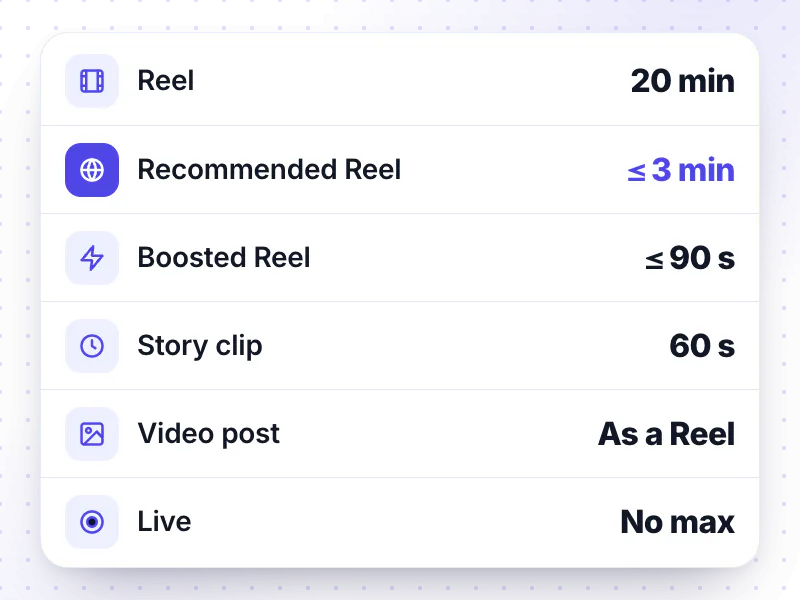
An Instagram Reel can be up to 20 minutes long, but Instagram recommends only Reels of 3 minutes or less to new audiences. A single Story clip holds 60 seconds, and a boosted Reel must stay at 90 seconds or less. Those three numbers settle most plans, and the sections below show where each one comes from.
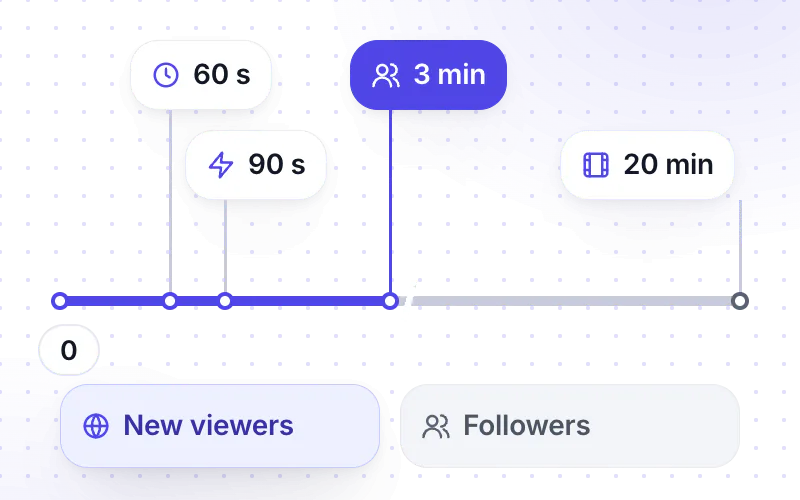
Instagram sets a separate limit for each video format, and the limits sit on different Help Center pages. The table collects them in one place, with the source of each number.
| Format | Limit | Source |
|---|---|---|
| Reel | Up to 20 minutes, one clip or several | Help Center: Record a reel |
| Reel recommended to new viewers | 3 minutes or less | Help Center: Record a reel |
| Boosted Reel | 90 seconds or less, full-screen 9:16 | Help Center: Boost a reel |
| Story clip | 60 seconds, longer videos split into clips | Help Center: Share to your story |
| Video post | Shared as a Reel | Instagram announcement |
| Live video | No maximum published | Help Center: Start a live video |
Note
Instagram rolls out Reels features account by account. The Help Center notes that Reels isn't available to everyone yet, so your app may show an older limit for a while.
The Instagram Reel length limit is 20 minutes. Instagram's Help Center says you can record and edit videos up to 20 minutes and that one or several clips can add up to that total. A progress bar at the top of the camera shows how much time you've already recorded.
Recording in the app vs uploading a finished video
The 20-minute limit covers both routes into a Reel. The Help Center describes recording clips in the Instagram camera and also uploading a finished video, from your phone's camera roll or from a computer on instagram.com. Buffer's guide confirms the same ceiling for both routes. For a long edit, finishing it in a video editor and uploading the file gives more control over cuts than recording in the app.
The 3-minute line for recommendations
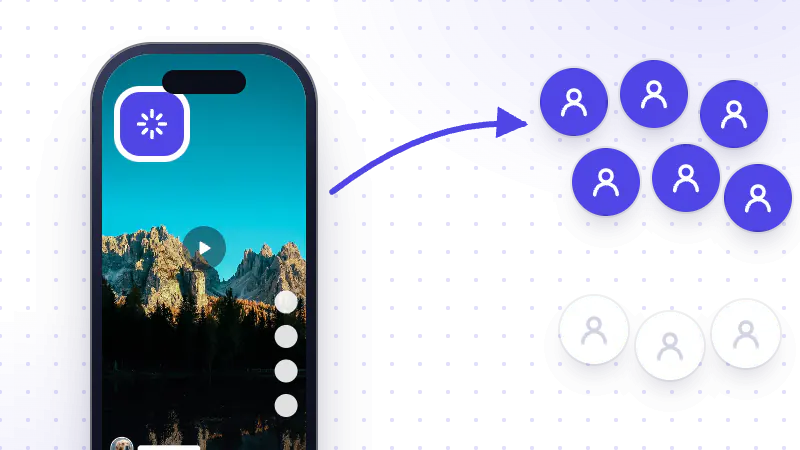
The same Help Center page adds the rule that matters for growth: Reels over 3 minutes won't be recommended to new audiences. A 10-minute Reel still publishes, stays on your profile and reaches your followers. It just doesn't enter the recommendations, such as Explore and the Reels viewer, that show Reels to people who don't follow you.
Why other guides say 90 seconds or 3 minutes
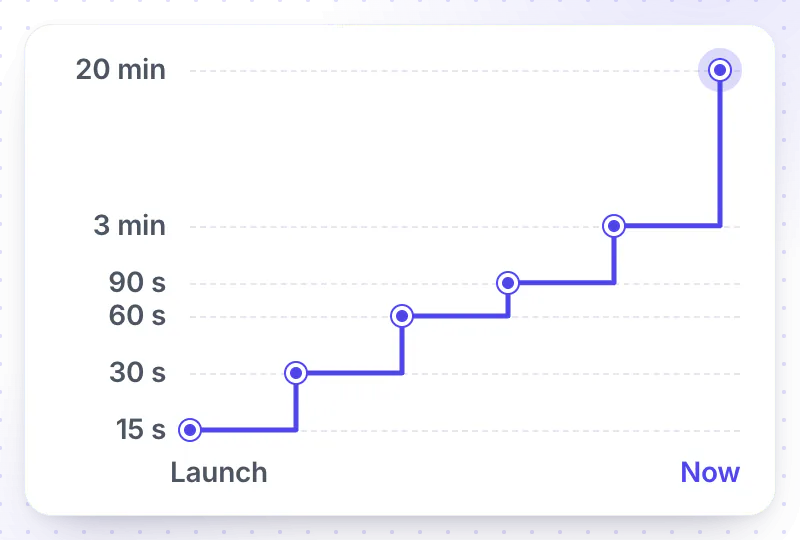
Older answers to how long can an Instagram Reel be are not wrong, they are out of date. Metricool's history of the format traces the limit through 15, 30, 60 and 90 seconds, then 3 minutes, and Instagram's Help Center now gives 20 minutes. A guide that quotes 90 seconds or 3 minutes describes an earlier step.
The 90-second limit for boosted Reels
Boosting turns a Reel into an ad, and ads follow stricter rules. Instagram's boost page requires Reels of 90 seconds or less in a full-screen 9:16 vertical format. Boosted Reels also can't use licensed music, so a Reel planned as an ad needs royalty-free music or original audio from the start.
Reels are not the only place for video. The Instagram video length limit depends on where you publish, and Stories, video posts and Live each follow their own rule.
Stories: 60 seconds per clip
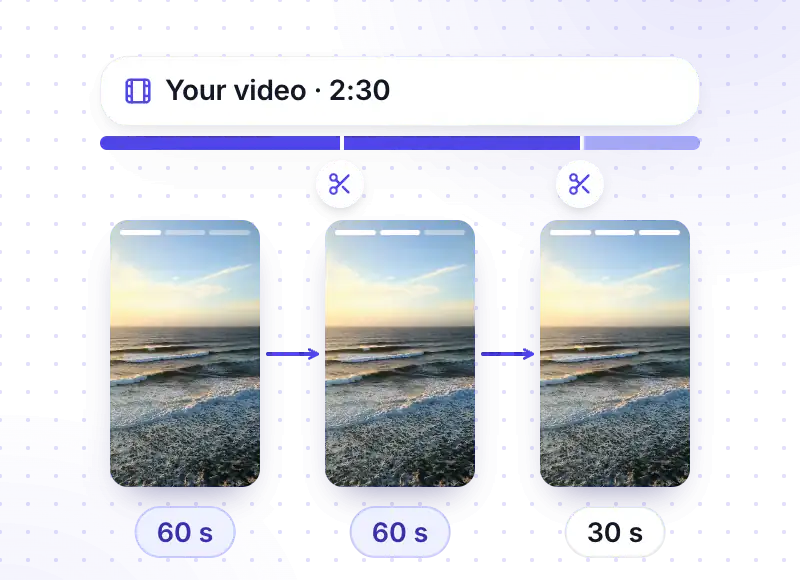
Instagram plays a Story video of up to 60 seconds as one clip. Longer videos are broken into several clips, which you can edit with the video trimmer on iPhone. The Instagram story video length per clip therefore stays at 60 seconds, even when the whole upload is longer.
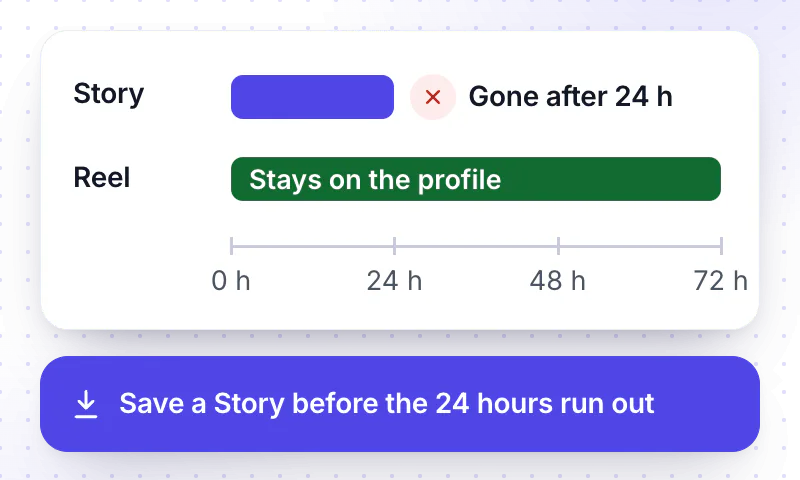
A Story also has a lifetime limit. Photos and videos in a Story disappear from Feed, your profile and messages after 24 hours, unless you add them to Highlights. The guide to Instagram Reels vs Stories compares the two formats point by point.
Video posts: shared as Reels
Instagram announced that new video posts shorter than 15 minutes are shared as Reels, and the same announcement merged the Video and Reels tabs on profiles. In practice, a video you post to your feed follows Reels rules, including the 3-minute line for recommendations.
Live videos: no published maximum
Instagram's Help Center page on starting a live video gives no maximum length. It sets a different gate: only public accounts with 1,000 followers or more can start a Live. After the broadcast ends, the replay can be shared to your profile or downloaded from the Live Archive.
Warning
The Help Center pages checked for this guide don't publish a length limit for videos sent in messages or for video slides in a carousel. Treat any exact number for those formats as unconfirmed.
The best length depends on the goal: reaching new people or deepening ties with followers. The largest open data set on this comes from Buffer, which analyzed 2.7 million Reels published through its scheduling tool and compared each Reel with its own account's average.
90 seconds to 3 minutes for reach
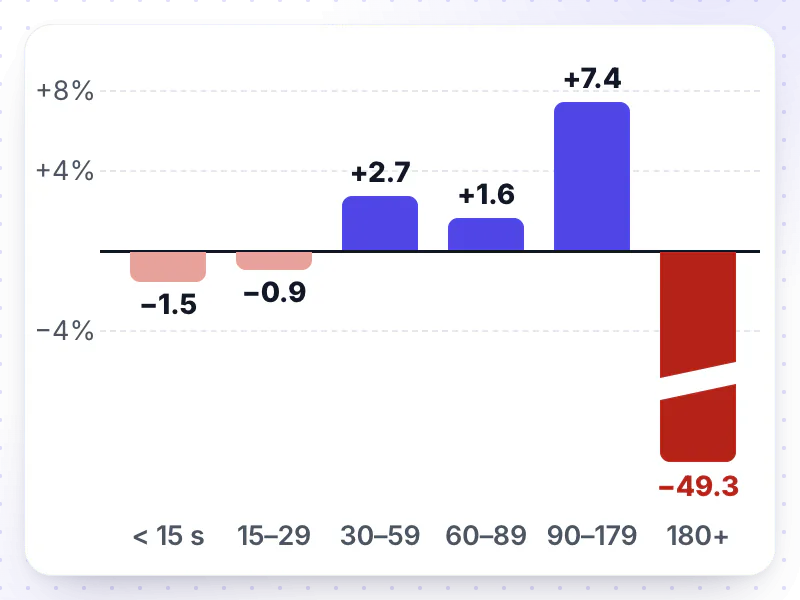
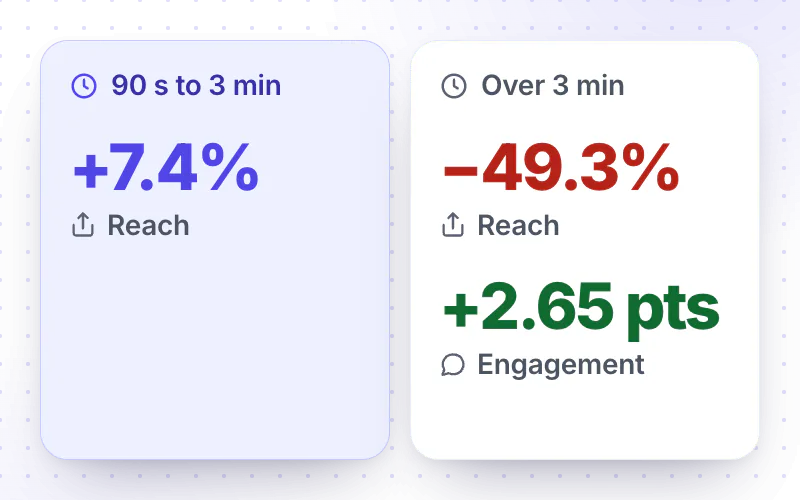
Reels between 90 seconds and 3 minutes reached the most people in Buffer's data, 4 to 7 percent more than each account's average. Below 90 seconds, length barely mattered: every bucket from under 15 seconds to 89 seconds landed within about 3 percent of the account's usual reach. A short Reel works when the idea is short.
Over 3 minutes for engagement
Reels of 180 seconds or longer reached 49.3 percent fewer people than the same account's average, which matches Instagram's rule against recommending them. Their engagement rate, however, was 2.65 percentage points above the account's average, the highest of any length. Fewer people watch a long Reel, but those who stay comment, save and share more.
Tip
Buffer's numbers are averages across accounts. The typical account in the study saw a smaller lift, closer to 4 percent, so test lengths with your own audience. Instagram shows each Reel's plays, likes and comments in its info, which is enough to compare a 60-second cut with a 2-minute one over a few weeks.
Creators who post the same video to several apps need the strictest limit, not the longest one. Buffer's comparison table lists the maximum for each platform:
| Platform | Maximum length | Note |
|---|---|---|
| Instagram Reels | 20 minutes | Recommended to non-followers only at 3 minutes or less |
| TikTok | 10 minutes recorded in the app, 60 minutes uploaded | Uploads can run longer than in-app recordings |
| YouTube Shorts | 3 minutes | Longer videos publish as regular YouTube videos |
A cut of 3 minutes or less fits all three, which keeps cross-posting to one export with no re-edits. It also stays inside Instagram's recommendation limit.
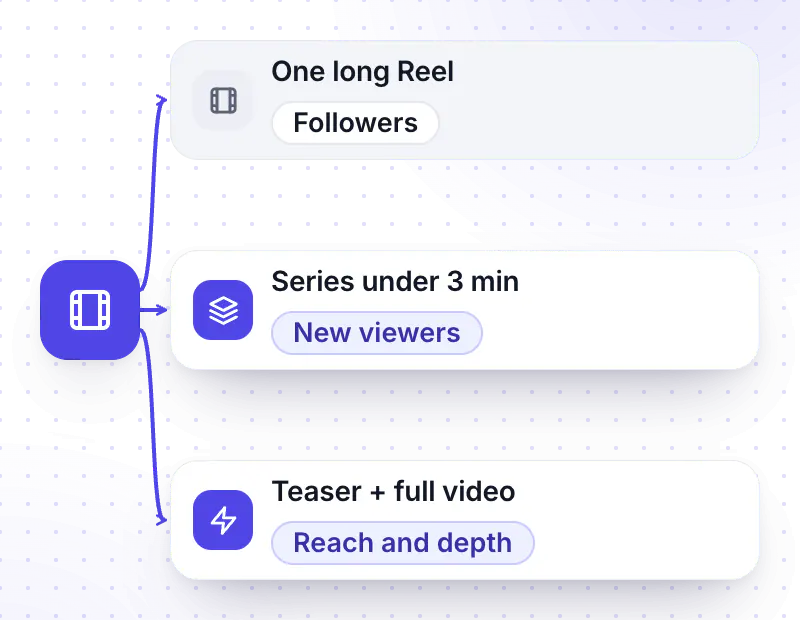
A long video can still reach new people if you split it on purpose. Three approaches cover most cases:
- One long Reel. Keep the full video for followers who want depth, and accept that it won't be recommended to new viewers.
- A series of short Reels. Cut the video into parts under 3 minutes, so each part can enter recommendations on its own.
- A teaser and the full video. Post a short Reel with the key moment and point viewers to the long version on your profile or in your Story.
How to cut a long video into a series
A series works when each part makes sense alone. Cut at natural topic changes rather than at fixed time marks, so every part answers one question. Open each part with its own hook in the first seconds, because a viewer from recommendations may never have seen part one. Number the parts in the caption and on the cover, and pin the first part to your profile so new viewers start at the beginning.
Tutorials and storytelling videos split well. Long interviews and live recordings split less well, since their value often sits in the full flow. For those, the teaser approach usually keeps more of the story intact.
Trial Reels help here as well: they show a Reel to non-followers first, so you can compare a short cut with a long one. The guide to Instagram trial Reels explains how they work, and the guide to Instagram Reel size covers the 9:16 frame and safe zones for the cut.
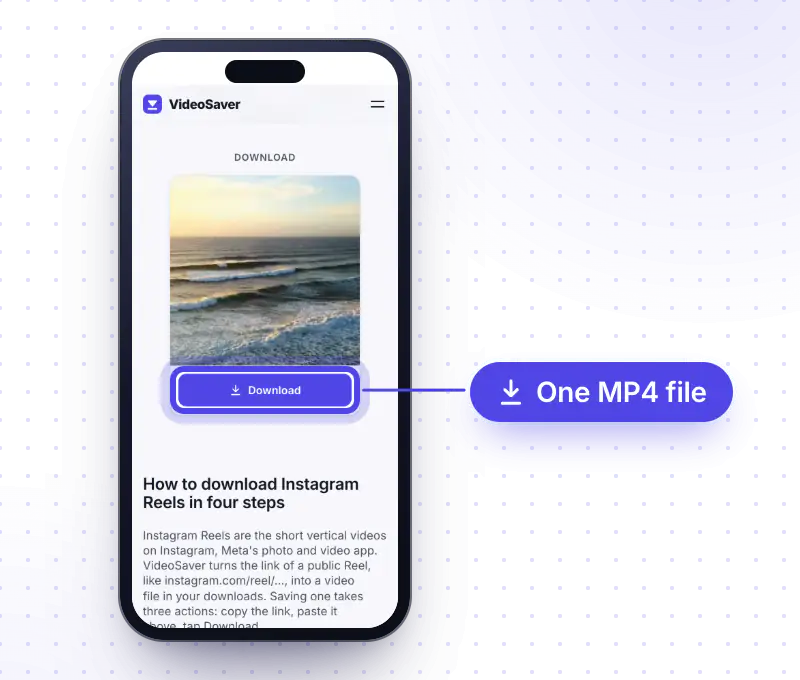
Length decides how a Reel is distributed, not how it is saved. VideoSaver saves a public Reel as one MP4 file from its link, without a watermark and without an Instagram login. The steps for iPhone and Android are in the guide to saving Instagram Reels to your camera roll.
Stories leave after 24 hours, so a Story you want to keep needs a quicker decision. The Instagram Story downloader saves the active Stories of a public account by username or link, and the account owner won't see you in the viewers list.
Frequently asked questions
Short answers to the questions readers ask most about this topic.
What is the maximum length of an Instagram Reel?
An Instagram Reel can be up to 20 minutes long. Instagram's Help Center says you can record one clip or several clips that add up to 20 minutes, and the progress bar shows how much you've used. Some accounts get new Reels features later than others, so the limit in your app may lag behind.
Can an Instagram Reel be longer than 3 minutes?
Yes. Instagram accepts Reels up to 20 minutes, but it doesn't recommend Reels over 3 minutes to new audiences. A longer Reel still reaches your followers and stays on your profile. In Buffer's study, Reels of 180 seconds or longer reached 49.3% fewer people than the same account's average.
How long can an Instagram Story video be?
A single Story clip can be up to 60 seconds long. When you share a longer video to your Story, Instagram splits it into several back-to-back clips, and on iPhone you can adjust them with the video trimmer. Each Story stays visible for 24 hours unless you add it to Highlights.
Why does Instagram cut my video at 90 seconds?
A 90-second limit usually means one of two things. Boosted Reels must be 90 seconds or less, so a Reel planned as an ad has to fit that limit. An older app version or an account without the latest Reels camera may also show an earlier limit, so update Instagram and check again.
How long should an Instagram Reel be?
For reach, aim for 90 seconds to 3 minutes. Buffer's study of 2.7 million Reels found that this range reached 4 to 7 percent more people than each account's average. Below 90 seconds, length barely changed reach, so a short Reel works when the idea is short.
Sources
Facts about Instagram features in this article come from these pages.
- Instagram Help Center: Record a reel on Instagram help.instagram.com
- Instagram Help Center: How to boost an Instagram reel help.instagram.com
- Instagram Help Center: Share a photo or video to your Instagram story help.instagram.com
- Instagram Help Center: How long Instagram stories remain visible help.instagram.com
- Instagram Help Center: Start a live video on Instagram help.instagram.com
- Instagram: Introducing New Ways to Collaborate and Create with Reels about.instagram.com
- Instagram: How to Use Instagram Stories about.instagram.com
- Instagram Help Center: See info about your reel on Instagram help.instagram.com
- Buffer: How Long Should Instagram Reels Be? We Analyzed 2.7 Million Reels buffer.com
- Metricool: How Long Can Instagram Reels Be? metricool.com