What Is a Trial Reel on Instagram? How It Works and How to Post One
A trial reel is an Instagram Reel shown to non-followers first, so you see how it performs before your followers do. Here is who can post one, what happens after 24 and 72 hours, and how to use trials to test two hooks fairly.
Short answer
A trial reel is an Instagram Reel that goes to non-followers first, so you can see how it performs before your followers see it. That is the short answer to what is a trial reel on Instagram. Instagram shows early metrics after about 24 hours, and an optional setting shares the Reel with your followers if it does well in the first 72 hours.
Trial reels are normal Reels with one switch turned on before posting. The switch changes the first audience, not the editing tools. Instagram for Creators describes trial reels as Reels that are shown to non-followers first, and the Meta newsroom post on the launch says the same.
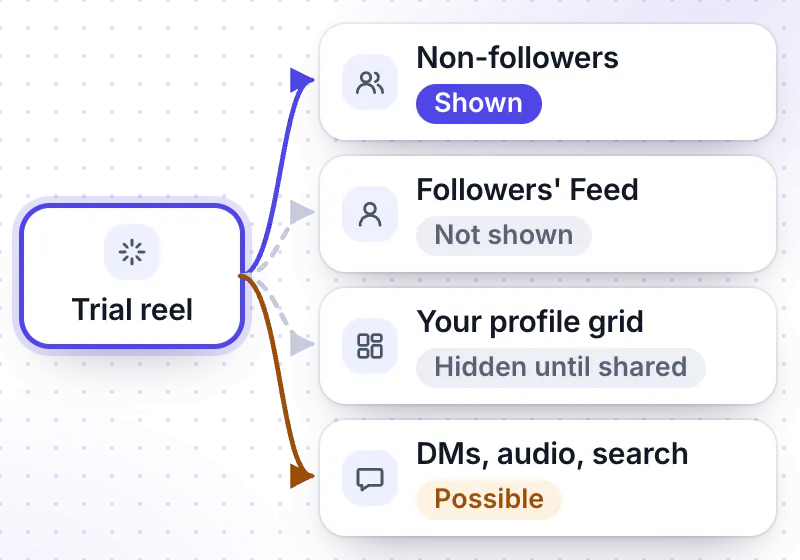
While the Reel is in trial, three things stay hidden. Followers do not get it in their Feed or in the Reels tab. The Reel does not appear on your main grid or in the Reels tab of your profile. Only you can see that the Reel is a trial, and you find it on your profile next to your drafts.
Who sees a trial reel and who does not
Non-followers see trial reels through recommendations. Followers are the exception with a catch: Instagram notes that some of them can still reach trial reels through a direct message, an audio page or search results. A trial is therefore not a private draft. Treat anything you post as a trial as public.
Note
Trial reels work only on public accounts. Followers of a private account would see every Reel anyway, and private accounts do not get the feature.
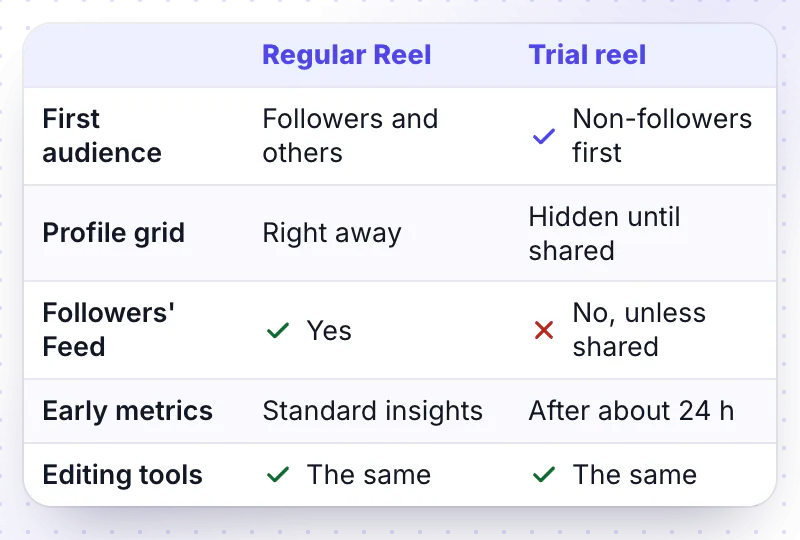
The two formats share the camera, the editor, audio, captions and length limits. The difference sits in distribution and in how fast you get a signal. If you are still choosing between Reels, Stories and feed posts, the Reels vs Stories guide covers those formats first.
| Attribute | Regular Reel | Trial reel |
|---|---|---|
| First audience | Followers and non-followers | Non-followers first |
| Profile grid | Shows right away | Hidden until you share it |
| Followers' Feed and Reels tab | Yes | No, unless you share it |
| Early metrics | Standard insights | Views, likes, comments and shares after about 24 hours |
| Reaching followers | Automatic | Manual share, or auto-share based on the first 72 hours |
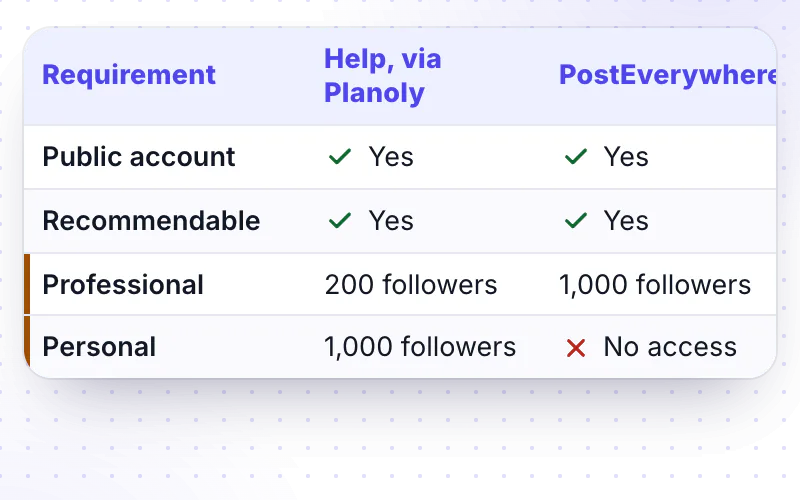
Every source on trial reels agrees on two conditions. The account must be public, and it must be eligible to appear in recommendations. Planoly quotes the Instagram Help Center on the second condition: an account that cannot appear in recommendations loses access to trial reels too.
The follower minimum is where sources split. Planoly and the Metricool help center, both citing Instagram, give 200 followers for professional accounts (a creator account or a business account) and 1,000 followers for personal accounts. The PostEverywhere guide says the feature needs a professional account with at least 1,000 followers and attributes that figure to Adam Mosseri, the head of Instagram. Instagram has changed the rollout more than once, so the number in your own app is the one that counts.
Why the Trial option may be missing
The Trial switch is missing for one of four reasons, in this order of likelihood:
- The account is private. Switch to public, or accept that trials are not available.
- The account cannot appear in recommendations. Open Account Status in settings and look for recommendation restrictions.
- The account is below the follower minimum for its type.
- The app is out of date. Update it and open the Reel editor again.
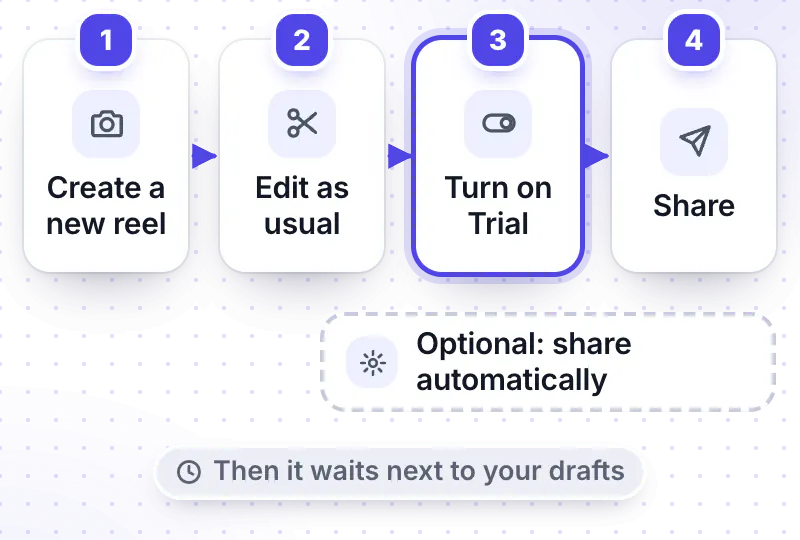
Posting trial reels takes the same steps as any Reel plus one switch. This is also the answer to how to make a trial reel on Instagram, because the Instagram trial reel setting is decided at posting time.
- Start a new reel. The Help Center text quoted by Planoly says to make sure you create a new reel for the trial.
- Record or upload the clips, then edit, add audio and write the caption as usual.
- On the last screen before sharing, turn on the Trial toggle.
- Optional: open Trial settings and turn on automatic sharing. According to the Help Center text quoted by Planoly, this choice carries over to later trials until you change it.
- Tap Share. The trial now waits on your profile next to your drafts.
People who ask how to do a trial reel on Instagram from a computer usually mean a scheduler. Scheduling tools such as Metricool publish trials through Meta's publishing API, and they apply the same follower rules. A scheduled trial that fails often returns a follower-requirement error in the tool.
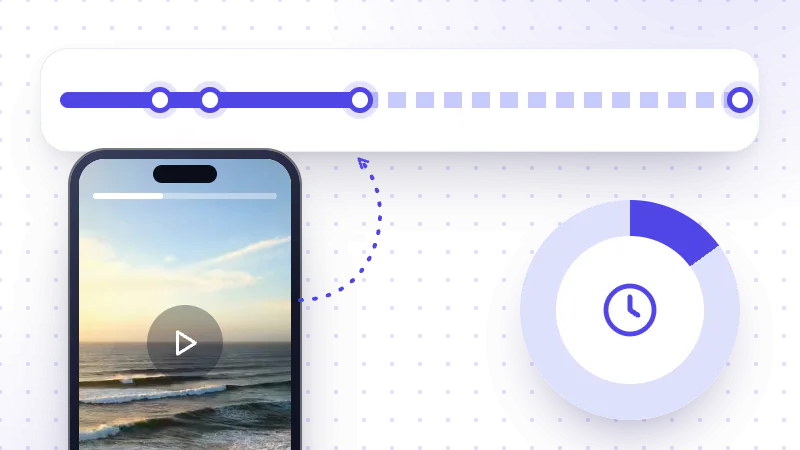
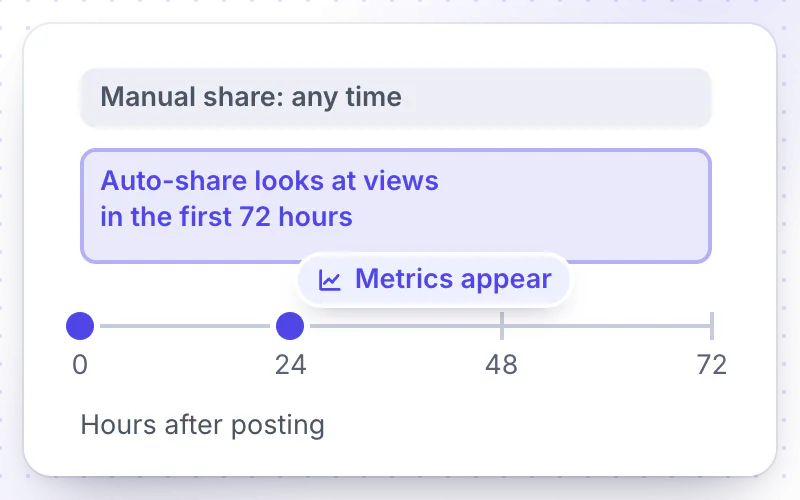
About 24 hours after posting, the reels viewer shows views, likes, comments and shares for trial reels. Instagram also compares the trial with your previous trials, which helps when you post them regularly. These are counts, not names, and the guide on who can see your Reel views explains what creators can and cannot see about viewers.
From then on you have two ways to reach followers:
- Share with everyone by hand. One tap moves the Reel to your followers and your main grid. You can do it at any time.
- Let Instagram share it. With automatic sharing on, Instagram shares the trial if it performs well, judged by views in the first 72 hours. Instagram does not publish the threshold, so an Instagram trial reel that is not shared automatically has not failed by any fixed rule.
Once shared, the Reel lives on your profile grid like any other Reel.
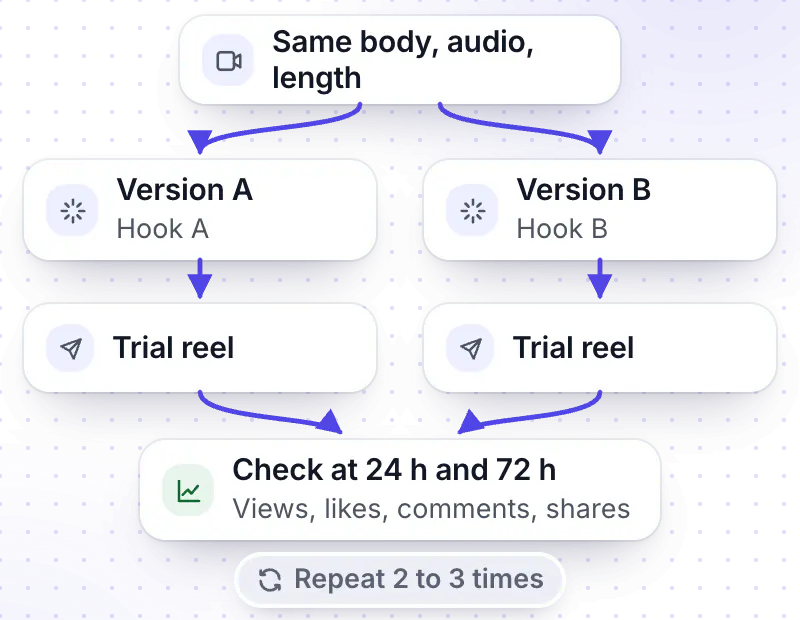
Trial reels are a natural place for a small A/B test, because both versions reach new audiences who have never seen your account. The method below is ours, not an Instagram feature. Instagram gives you the audience and the metrics, and the discipline of the test is up to you.
Change one thing only
Pick a single variable, and the hook is the best first choice: the first seconds of the video or the on-screen text. Keep the body of the video, the audio, the caption, the length and the Reel size and aspect ratio identical. If you change the sound as well, a difference in views can come from the track rather than the hook. Audio deserves its own test later, and the guide on finding trending audio helps you pick a track for it. Length should stay equal too, and the Reels length guide lists the limits for each format.
Read the same numbers at the same time
Post both versions as trial reels close together, ideally within the same hour, so the time of day does not decide the result. Read views, likes, comments and shares for both at the 24-hour checkpoint and again at 72 hours. The 72-hour mark matters because automatic sharing looks at views over the same window.
Log the result before you decide
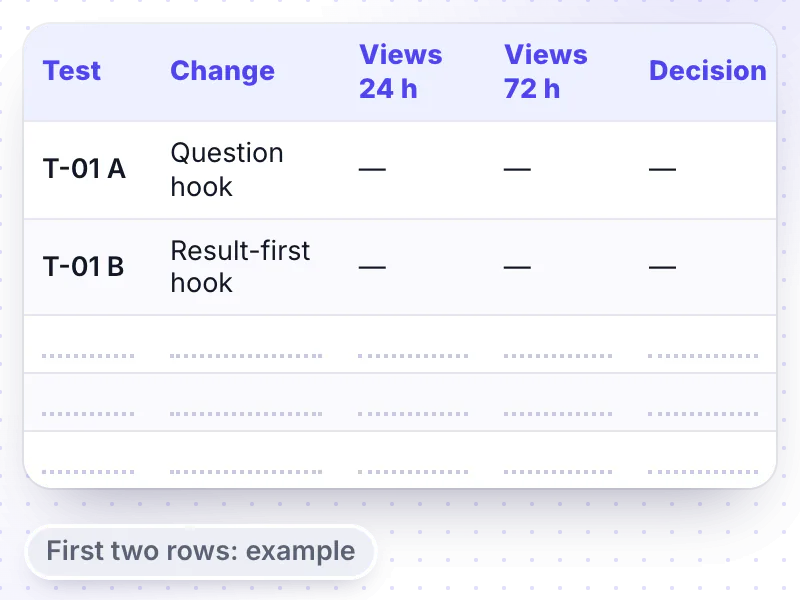
Write the numbers into a log before you share the winner. A log stops you from remembering the result you hoped for, and after a few tests it shows which kind of hook works for your account.
Warning
Non-followers are not your followers. A hook that wins with strangers can land differently with people who already know you, and one pair of trials is a small sample. Repeat the same comparison two or three times before you change how you open every Instagram trial reel.
Trial reels are easy to lose track of once a test ends. A test is only useful if you can reuse the winner, so export both edits from your editor before you post and name the files after the test ID, for example T-01-A and T-01-B. The loser often becomes the base for the next test, and the winner may be reposted later or cut for another platform. If you want to share someone else's Reel instead of your own, the guide on reposting a Reel with credit and permission covers that case.
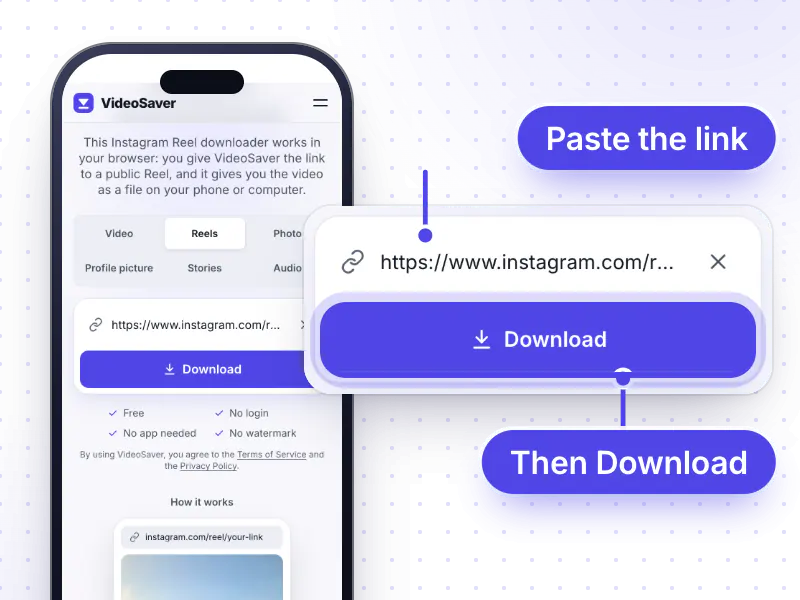
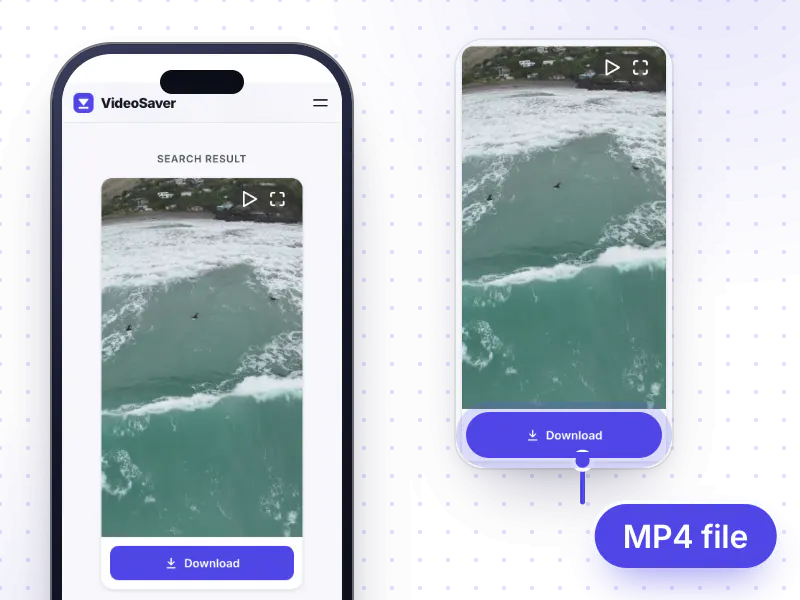
If a version exists only on Instagram, the guide to downloading your own Reels covers the built-in options and their limits. A trial that you shared with everyone sits on your public grid like any other Reel, so its link works in the VideoSaver Instagram Reels downloader. The tool saves it as an MP4 file in the quality Instagram serves, with no watermark added by VideoSaver.
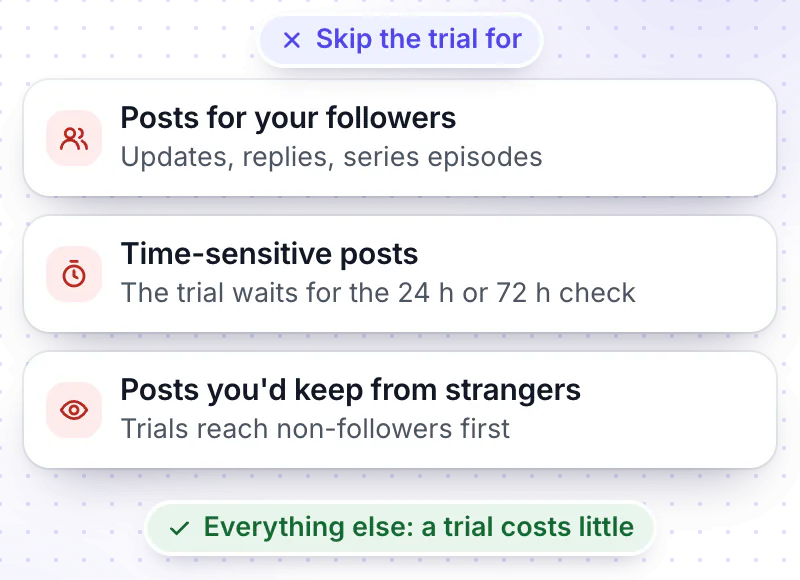
Trial reels test how strangers react. That makes them a poor fit for a few kinds of posts:
- Posts for people who already follow you. Community updates, replies to comments and series episodes need followers, and a trial delays them.
- Time-sensitive posts. An event reminder or a launch that matters today loses its window while the trial waits for the 24-hour or 72-hour checkpoint.
- Anything you would not want strangers to find. Trials reach strangers first, and some followers can still find them through messages, audio pages and search.
For everything else, trial reels cost little. The Reel is made either way, and the trial adds a day of data on your content ideas before they shape your content strategy.
Frequently asked questions
Short answers to the questions readers ask most about this topic.
Do my followers see a trial reel?
Mostly no. Instagram shows trial reels to people who don't follow you first and keeps them out of your followers' Feed and Reels tab. Some followers can still reach it through a direct message, an audio page or search. Followers see it in the usual places only after you share it with everyone.
When do insights for trial reels appear?
About 24 hours after you post. Instagram then shows views, likes, comments and shares for the trial in the reels viewer, and it compares the trial with your previous trials. Read both versions of a test at the same checkpoint so the numbers stay comparable.
What does automatic sharing do for trial reels?
Automatic sharing lets Instagram publish the trial to your followers if it performs well, judged by the views it gets in the first 72 hours. Instagram does not publish the exact threshold. You can turn the setting off at any time and share the trial yourself instead.
Why can't I see the Trial option on Instagram?
The account usually does not meet the rules. Trial reels need a public account that can appear in recommendations and a minimum number of followers. Sources disagree on that minimum, so check Account Status in settings and update the app before you assume the feature is missing.
Does a trial reel show on my profile grid?
No, not while it is a trial. The trial stays on your profile next to your drafts, and only you can see that it is a trial. After you share it with everyone, by hand or through automatic sharing, the Reel moves to your main grid like any other Reel.
Sources
Facts about Instagram features in this article come from these pages.
- Trial reels: Try content with non-followers first to see what performs best (Instagram for Creators) creators.instagram.com
- Test Content With Non-Followers Using Trial Reels (Meta Newsroom) about.fb.com
- How to Post a Trial Reel on Instagram (Planoly, quotes the Instagram Help Center) planoly.com
- How to publish Instagram trial reels in Metricool (requirements and error messages) help.metricool.com
- What Are Instagram Trial Reels? (PostEverywhere, 1,000-follower threshold) posteverywhere.ai