How to Find a Song From an Instagram Reel (Even When There's No Audio Label)
The audio label names the song in many Reels, but Original audio, voice-overs and remixes hide it. This guide gives four methods in order, from a one-tap check to identifying a clean clip of the Reel's sound.
Short answer
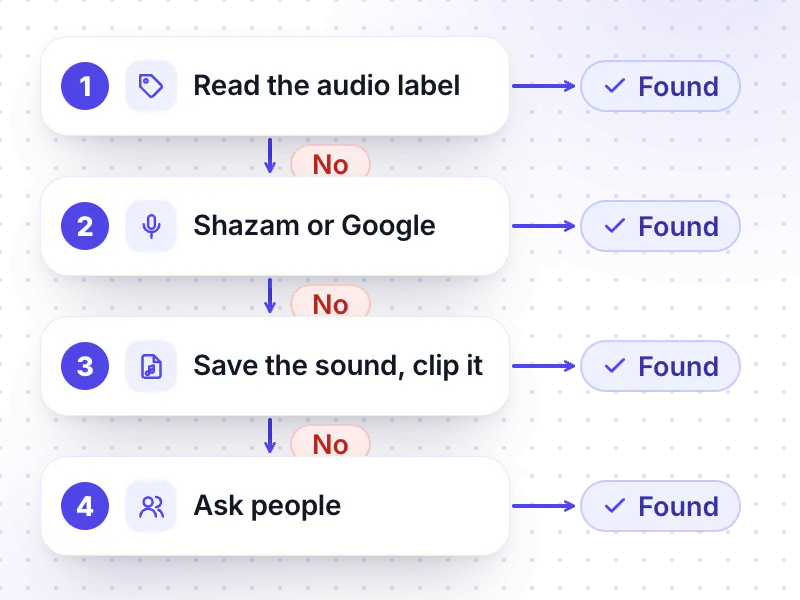
To find a song from an Instagram Reel, tap the audio label under the Reel first, because Instagram often names the track there. When the label says Original audio or the song hides under a voice-over, play the Reel to Shazam or Google, then try a clean clip of the Reel's saved sound. A song-ID community is the last step for remixes and rare tracks. The flowchart below is the whole answer to how to find song from Instagram Reel posts in four moves.
Every Reel with sound shows an audio label at the bottom, and a tap on it opens the audio page with the full track name and other Reels that use it. Instagram's Help Center sets two rules for that label. Licensed audio from Instagram's music library must show the artist and the track name. Original audio shows the creator's username instead.
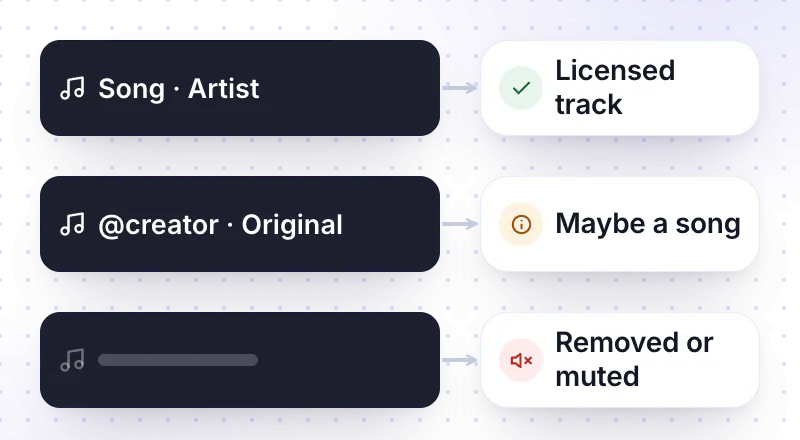
A label with a song title is the end of the search. Open the audio page to see the title, and save the audio inside Instagram if you want to use it in your own Reel later. Our guide on saving audio from Instagram explains the difference between that bookmark and a real audio file.
What "Original audio" really means
Original audio is sound the creator recorded in the app or uploaded inside a video, according to Instagram's Help Center. That definition covers a voice-over, a live recording and a song played in the background at the same time. The whole mix becomes one track under the creator's name.
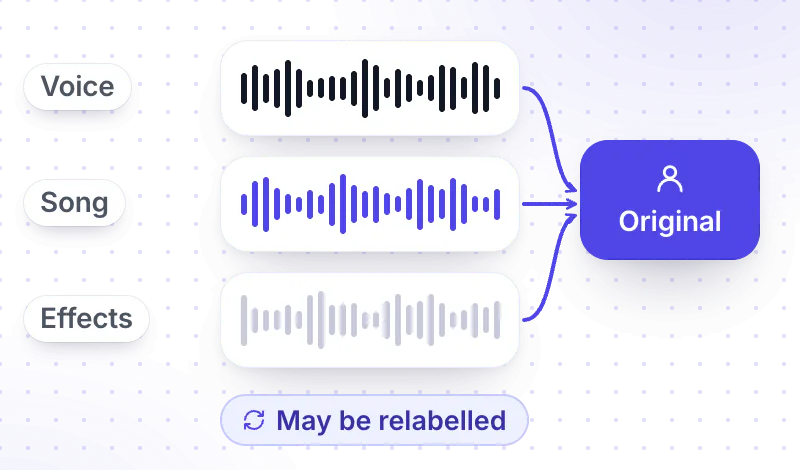
Instagram tries to catch songs inside original audio. The Help Center says that when Instagram detects licensed audio in a Reel, it changes the label from Original audio to the artist and song title. Detection misses some tracks, especially under a voice-over or after a speed change, and creators can remove a wrong match. An Original audio label therefore means "not identified", not "no song".
A song recognizer listens through the microphone and compares a short sample with a database of recordings. On iPhone, Apple's Control Center has a Recognize Music button: add it once with the Add Controls button, then open Control Center and tap it while the Reel plays. The Shazam app can keep listening while you switch to other apps, according to Apple.
On Android or iPhone, the Google app does the same job. Open the Google app, tap the microphone in the search bar and choose Search a song, then play the Reel. Google Search Help adds that you can hum, whistle or sing the melody if the Reel is no longer at hand.
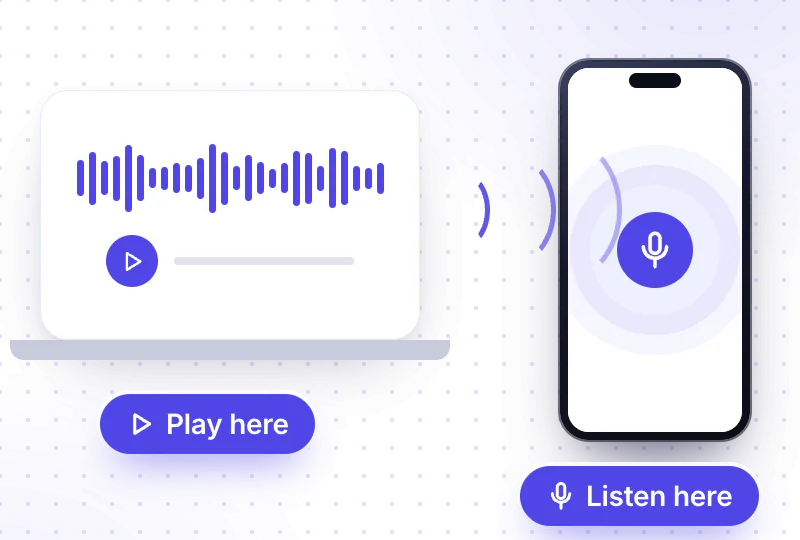
The most reliable setup for music recognition uses two devices. Play the Reel on a laptop or tablet at a good volume and hold the phone with Shazam or Google next to the speaker. This avoids the problem of one phone switching between Instagram and the recognizer. A Shazam Instagram Reel check takes about as long as the clip itself.
Why recognition fails on Reels
A recognizer matches an acoustic fingerprint, a compact summary of a recording. Four Reel habits change that fingerprint or hide it.
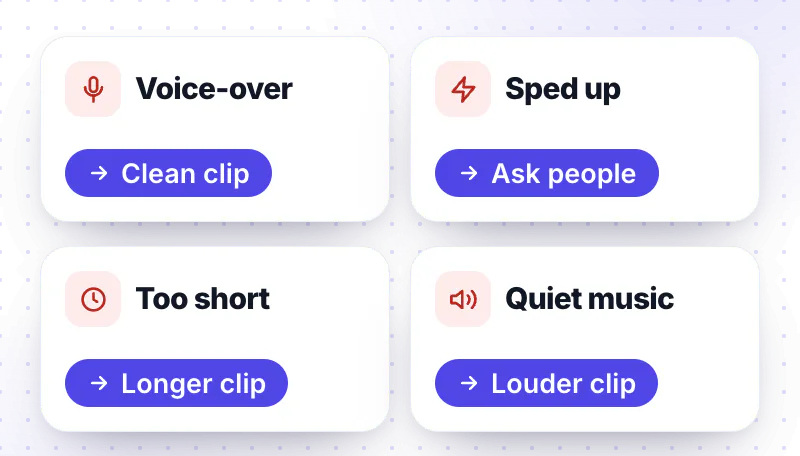
- A voice-over on top. Speech covers the music, so the sample contains two signals.
- Sped-up, slowed or pitched versions. A remix changes tempo and pitch, so the fingerprint no longer matches the original recording.
- Very short clips. A few seconds of a chorus give the recognizer less to compare.
- Quiet background music. Ambient noise and a low music level hide the melody.
Each problem has a workaround, and the next step handles the first and the fourth.
When a voice-over keeps defeating Shazam, take the Reels audio out of the app as a file and play only the audio clip where the music is alone. Intros, outros and pauses between sentences often carry a few seconds of clean music.
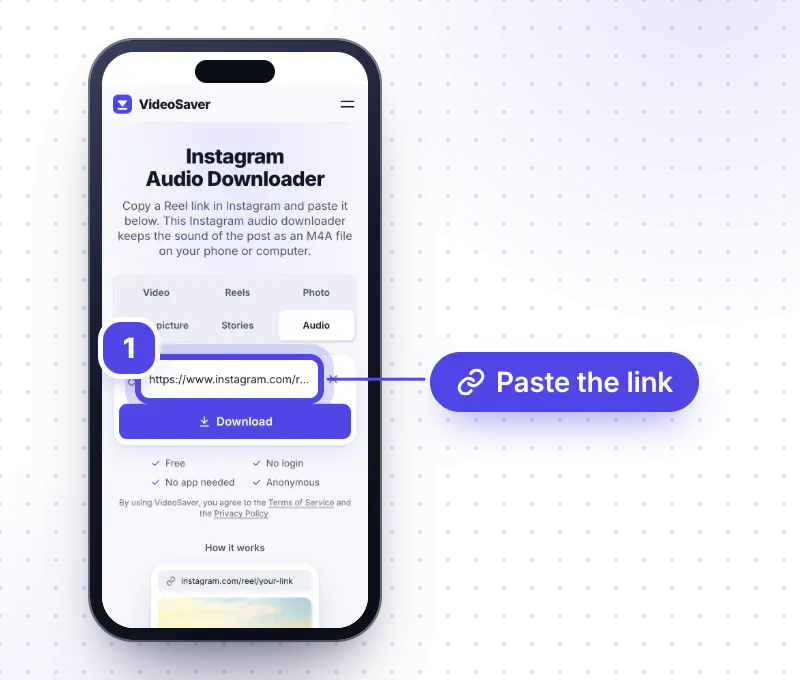
VideoSaver's Instagram audio downloader saves the sound of a public Reel as an M4A file with AAC audio, the codec Instagram uses for the sound inside its videos. It works without a login and without an Instagram account.
- Copy the Reel link from the share menu in Instagram.
- Paste it into the audio downloader and start the search.
- Tap Play to check the sound, then Download audio to save the M4A file.
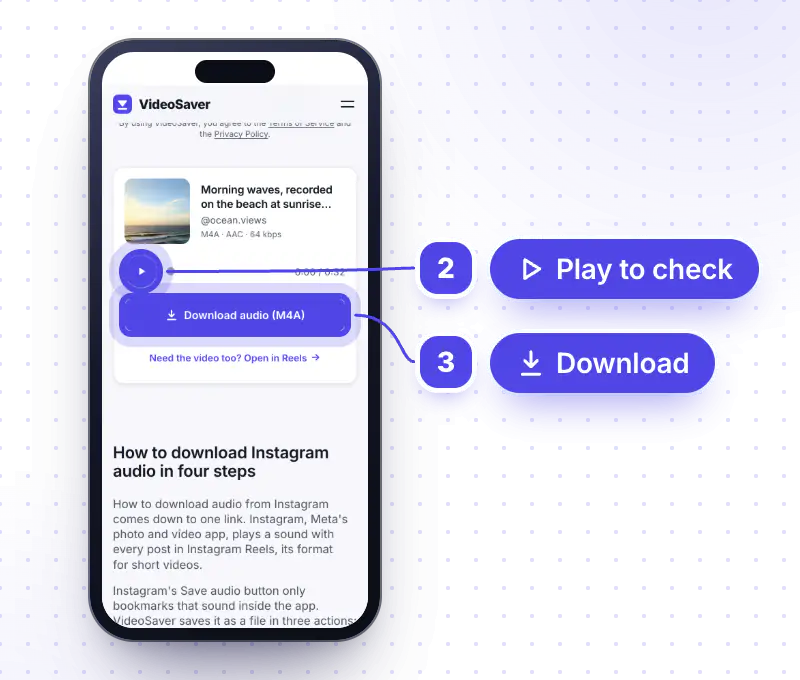
The file keeps the voice and the music together, as the Reel plays them. Open it in any audio editor, find the stretch where the music plays alone and trim it to ten seconds or more. Then play that clip from your computer while Shazam or Google listens on your phone.
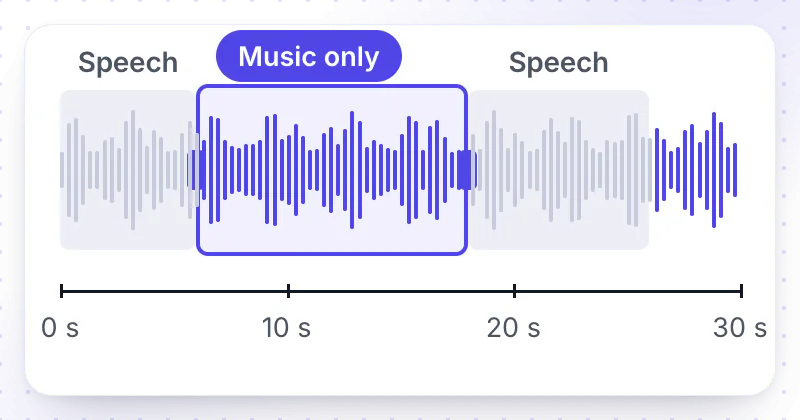
The saved file also helps when the Reel itself is hard to reach. You can play the same clip again and again, at full volume, without the app's interface or autoplay moving you to the next Reel.
Song finder sites that accept a Reel link
Some third party websites skip the playback step and take the video link directly. AHA Music, for example, describes its Instagram song finder this way: you paste a Reel link, watch a short ad and get the title and artist. Its page lists limits for guests, 2 video scans a day, and it states that Original audio and voice-overs often return no result. The same site accepts an uploaded audio file, which pairs well with a trimmed clip.
If you typed how to identify song from Instagram Reel link into a search bar, this is the short answer: paste the link into a finder site, or save the audio and identify a clean part of it. An Instagram Reel song finder never needs your Instagram password.
Warning
Skip any song finder that asks you to log in with Instagram. Identifying music needs the sound, not access to your account.
People still beat software on remixes, live versions and unreleased tracks. Read the comments under the Reel first, because someone has often asked already, and the creator may have answered. If not, ask politely in a comment and include the moment in the Reel, such as "song at 0:12".
Song-ID communities on Reddit, such as r/WhatsThisSong and r/NameThatSong, exist for exactly this task. Post the Reel link, the timestamp, the genre you hear and any lyrics you catch. A lyrics search on Google with a few words in quotation marks also works well for songs with clear vocals.
Pick the method by what you see and hear in the Reel, not by habit. Recognizers identify songs from recordings, so the closer your sample is to the released track, the better the odds.
| Situation | Try first | Why it works |
|---|---|---|
| The label shows a song title | Tap the label | Instagram already matched the track |
| Original audio, music clearly audible | Shazam or Google Search a song | The fingerprint can match the recording |
| A voice-over runs over the music | Save the audio and play a music-only clip | The clip removes the speech |
| Sped up, slowed or remixed | Lyrics search or a community | The fingerprint may not match the original |
| The Reel plays no sound | Check whether the track was muted | The song may be removed or blocked in your region |
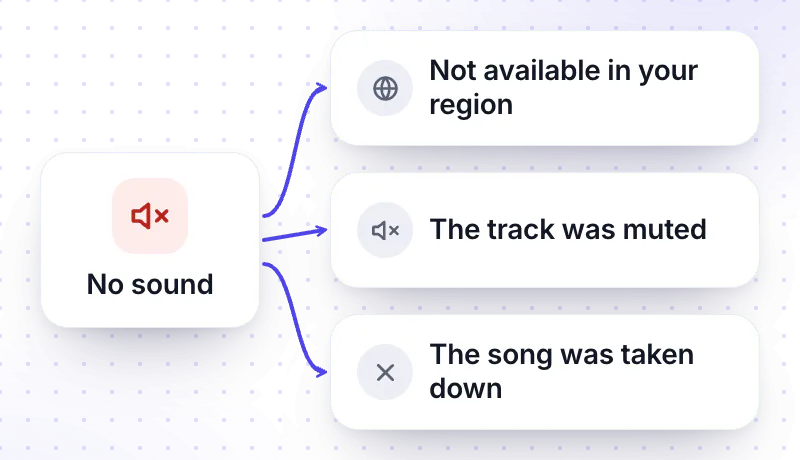
A Reel with no sound at all is a different problem. Instagram's Help Center lists reasons such as a track that isn't available in your region, a muted track and a song that was taken down. Our guide to Instagram audio not working covers those fixes.
The song name is the start of the next search, not the end. Learning how to find audio on Instagram pays off here too, because the audio page lists every Reel that uses the track. Search the title on your streaming service to hear the full track, or open its audio page in Instagram to see which Reels use it. If you want to ride the same sound in your own content, our guide on how to find trending audio on Instagram shows how to judge whether a sound is still growing.
Keep the copyright limit in mind for your own posts. Instagram's Help Center notes that when you download your own Reel with licensed music or another creator's original audio, the download comes without any audio. A saved M4A of someone else's Reel is for personal listening and identification, not for reposting.
Frequently asked questions
Short answers to the questions readers ask most about this topic.
Can Shazam identify a song from an Instagram Reel?
Yes, when the music is clear. Play the Reel aloud and tap Recognize Music in Control Center on iPhone, or open the Shazam app on another phone. Shazam often fails under a voice-over, on sped-up remixes and on very short clips. Then save the Reel's sound and play a clean part of it.
Why does the Reel say Original audio when it uses a song?
Original audio is the label for sound recorded or uploaded by the creator. When a song plays under a voice or was uploaded inside the video, Instagram can miss it. Instagram's Help Center says it relabels a Reel with the artist and title when it detects licensed music, but detection isn't guaranteed.
Is there an Instagram Reel song finder that works with a link?
Yes. Some song finder sites, such as AHA Music, accept a Reel link and return the title and artist after a short ad, with a small daily limit for guests. They fail on voice-overs and original sounds. Avoid any finder that asks you to log in with your Instagram account.
How do I find a song from a Reel I can't open anymore?
If the Reel was deleted or the account went private, its sound is gone from Instagram. Check your Watch history, Liked Reels and Saved items for a copy or a repost with the same audio. If you saved the sound as a file earlier, play it to a recognizer.
Sources
Facts about Instagram features in this article come from these pages.
- Instagram Help Center: What audio you can use in your reel on Instagram help.instagram.com
- Instagram Help Center: Add your own audio or someone else's original audio in your Instagram reel help.instagram.com
- Instagram Help Center: Problems with audio on Instagram help.instagram.com
- Apple Support: Use your Apple device to identify what song is playing support.apple.com
- Google Search Help: Find out what song plays near you support.google.com
- AHA Music: Instagram song finder (limits and method) aha-music.com