Instagram Audio Not Working? Fixes for Reels, Stories and Downloaded Videos With No Sound
Instagram sound fails in three different places: the phone during playback, the post itself and the downloaded file. Each place has its own cause and its own fix.
Short answer
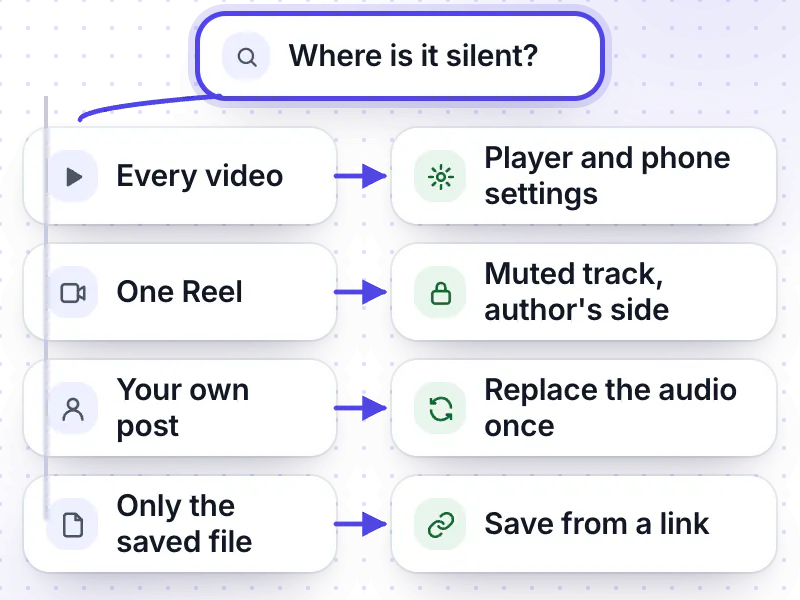
Instagram audio not working is three different problems that look the same: the phone stops playing sound, Instagram mutes the track on the post, or the downloaded copy loses its audio. Find which of the three you have, and the fix takes a minute. Most lists of fixes skip the third case, the silent saved file, so it gets its own section below.
The scope of the silence tells you the cause. If you see audio on Instagram not working on every video from every account, the phone or the app is at fault. When one Reel is silent while the rest play, Instagram muted that track. When your own post shows Audio unavailable, the music lost its license. When a Reel plays with sound in the app but the saved file is quiet, the download dropped the track.
Tip
Test two Reels from two different accounts before you change any setting. One silent Reel never points to a phone problem.
If every Reel and Story is quiet, the Instagram app is getting no volume from the phone or has its own sound control switched off. These checks go from the quickest to the slowest.
The sound control inside the player
Instagram mutes or unmutes a video when you tap anywhere on it while it plays, according to the Instagram Help Center. The volume buttons on the phone also turn the sound on during playback, and after that the same buttons change the level. An accidental tap is the most common reason an Instagram video has no sound for one session and plays normally the next.
Silent mode, media volume and Bluetooth
Silent mode on iPhone stops rings, alerts and sound effects. Apple notes that audio apps such as Music and many games still play sound in Silent mode, so behavior depends on the app. If Instagram goes quiet only when Silent mode is on, switch Silent mode off with the Ring/Silent switch, the Action button or the Silent mode button in Control Center, then play a Reel again.
Android keeps media volume separate from ring volume and call volume. Videos use media volume, so a phone that rings loudly can still play Reels at zero. Press a volume button while a Reel plays and drag the media slider up.
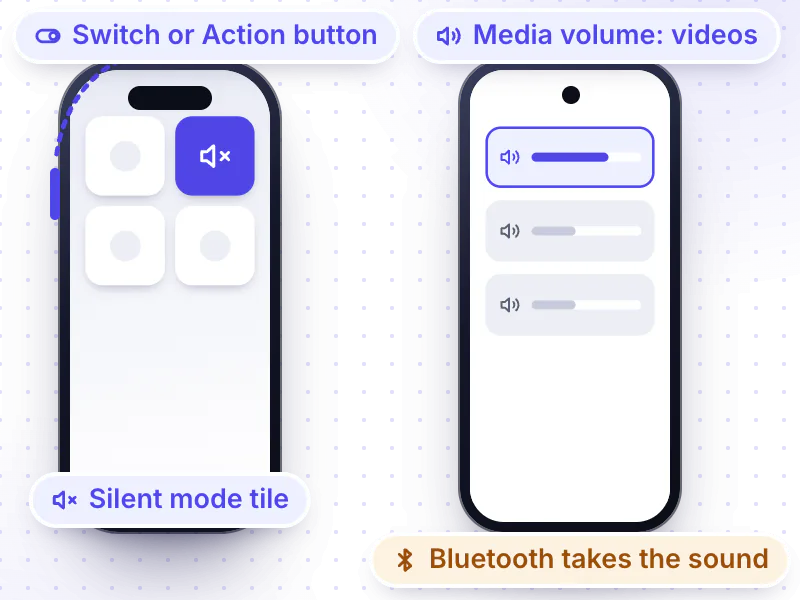
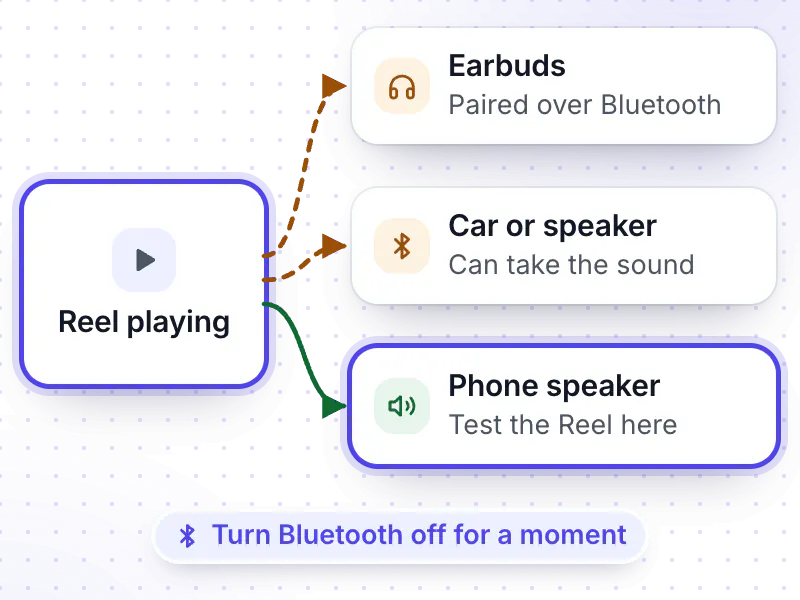
A paired Bluetooth speaker, car or pair of earbuds can take the sound without you noticing. Turn Bluetooth off for a moment and play the Reel through the phone speaker. If you find Instagram story audio not working only with earbuds in, the problem sits in the earbuds or their connection, not in Instagram.
Restart, update and clear the cache
A restart of the phone clears a stuck playback session in under a minute. An outdated Instagram app can also misbehave after a phone update, so install the latest version from the App Store or Google Play. On Android, clearing the cache of the Instagram app removes temporary files without deleting your account data. Reinstalling the app is the last step of this branch.
When the whole app is silent for everyone
Sometimes the fault is on Instagram's side. If restarting and updating change nothing, look at an outage tracker such as Downdetector for reports of Instagram problems in your area. A wide outage clears without any action from you.
A single silent Reel from another account is not a phone problem. The Instagram Help Center lists the reasons you can't hear the audio on someone else's content:
- The audio isn't available in your country or region.
- The person who made the Reel didn't have access to the audio's source, so the track was muted.
- The track was taken down.
- The artist or label is having technical issues.
- Instagram's licensing agreements with rights holders changed.
- The rights holder blocked the content because it contains material they own.
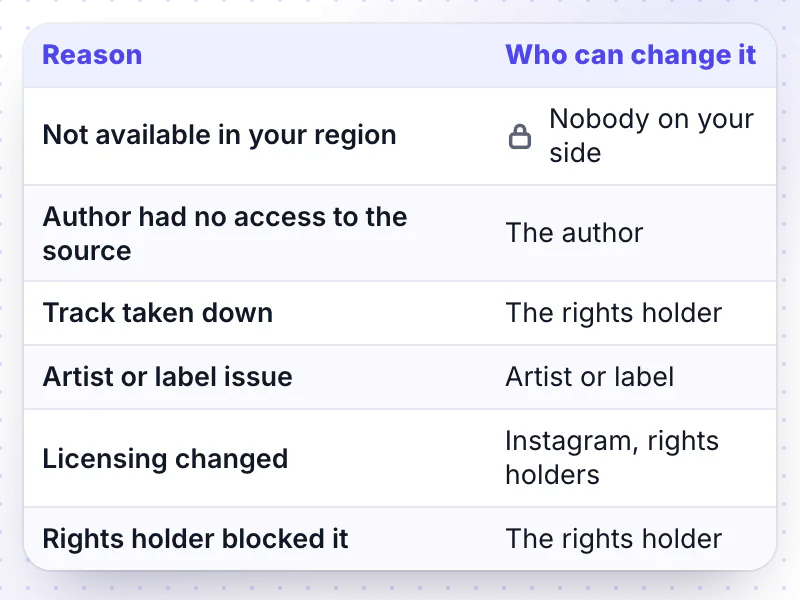
Music rights sit behind most of these reasons, and none of them can be fixed from the viewer's phone. Reinstalling the app leaves that Reel exactly as silent as before. The author can replace the track, and a rights holder can lift the block. If you want to know which song was playing, find the song from the Instagram Reel by its title, caption or a recognition app.
A Reel that had sound on the day you posted it and plays silent later usually lost the rights to its music. Instagram marks such a post with the label Audio unavailable. Why is my Instagram audio not working on a post that sounded fine before? The answer is almost always a change in licensing, not an error on your phone.
Replace a muted track on your own post
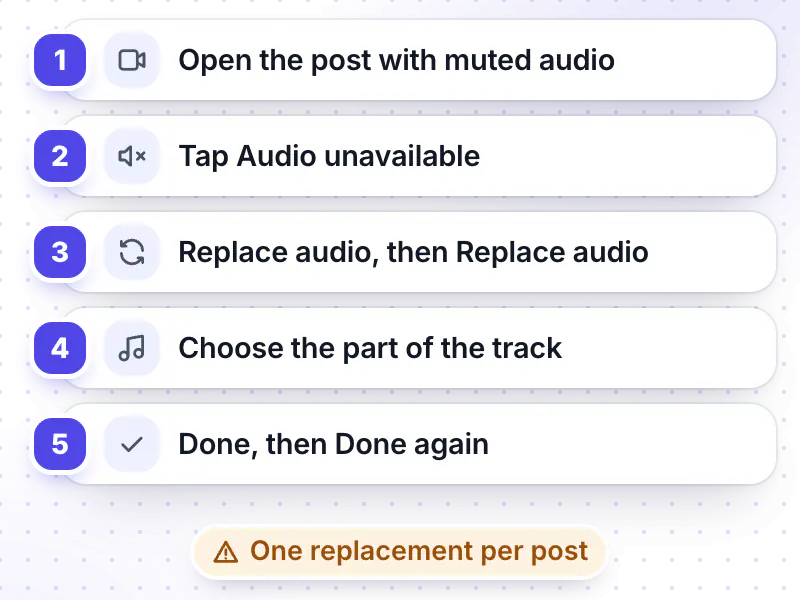
Instagram may mute the track on your post because you don't have access to the licensed music library, because licensing agreements changed, or because a rights holder blocked the content. The post stays visible to everyone, only without sound. The Instagram Help Center gives these steps to swap the track:
- Open the Instagram app and find the post with the muted audio.
- Tap Audio unavailable.
- Tap Replace audio, then tap Replace audio again.
- Choose the part of the track you want for your post.
- Tap Done in the top right, then tap Done again.
Warning
Instagram allows one replacement per post. Pick a track you have the right to use, or the new audio can be muted too.
Business accounts and regional music limits
Access to the licensed music library depends on the account type and on the country or region, according to the Instagram Help Center. Meta's Music Guidelines prohibit using music for commercial or non-personal purposes without the right licenses and warn that content can be blocked, muted or removed. The same guidelines say that music, even when allowed, may not be available in every country.
Music-licensing services and marketing blogs disagree on which accounts get the smaller library. Some name only business accounts, others add creators who post promotions. Instagram publishes no full list, so a switch of account type is an experiment, not a guaranteed fix. Royalty-free tracks from Meta's Sound Collection are the safer choice for brand content.
The clip was silent before it reached Instagram
Sometimes the upload had no usable track to begin with. Play the exported file on the phone or computer before posting it. A silent export means the editor left the sound out, and Instagram can only publish what it receives. Export again with the soundtrack turned on, then upload the new file.
A Reel that plays in the app and comes out silent as a file is the third problem, and phone settings play no part in it.
Why the built-in download drops licensed music
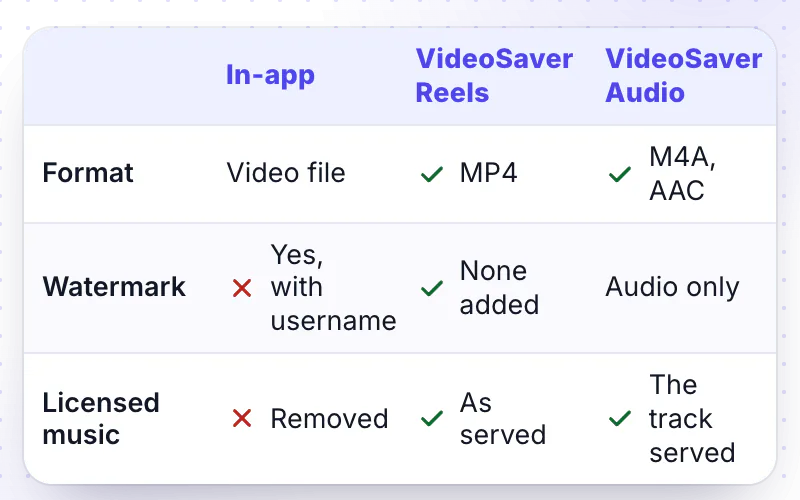
Instagram's own download button keeps the music only when the Reel is scored with original audio. When Instagram opened Reel downloads to everyone, it said that Reels with licensed music in the background lose that audio in the downloaded copy, as Engadget reported. The same copy carries the Instagram watermark with the account's username. Authors can also turn downloads off for their Reels, which is one reason an Instagram reel won't save to camera roll at all. The guide to saving Reels to your camera roll compares every method for that case.
A download bug on iPhone
Meta has also confirmed a bug in the Reels download feature on iPhone. A Meta spokesperson told XDA Developers that the feature was not working as intended for iOS users and that in some cases audio was missing in downloads. Android was not affected by that bug. If your own Reel exports silent on an iPhone after an edit, update the app and export again, or download your own Instagram Reels through the account data options.
Save the Reel or only its sound from a link
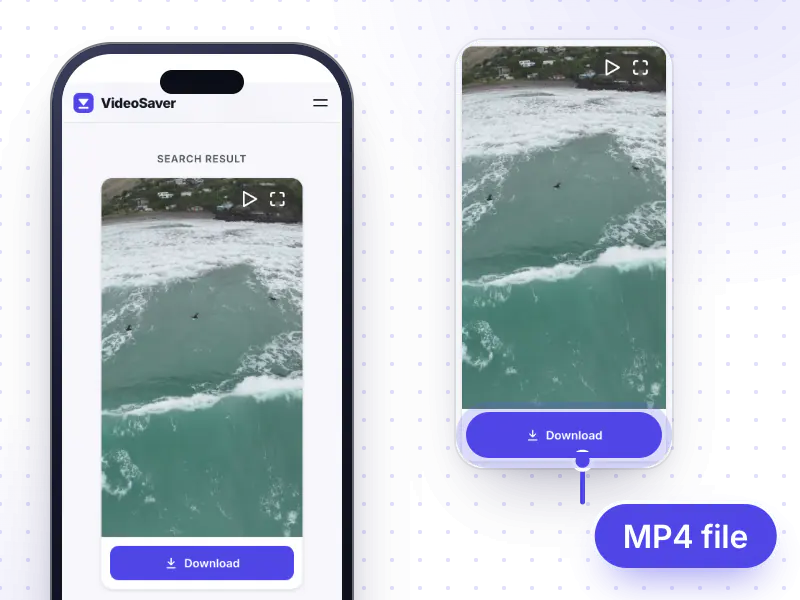
The VideoSaver Instagram Reels downloader saves a public Reel from its link as the MP4 file that Instagram serves for that Reel. VideoSaver adds no watermark and does not remove or mute anything in the file. If Instagram muted the track on the post itself, the file is silent too, because no tool can restore sound that Instagram stopped serving.
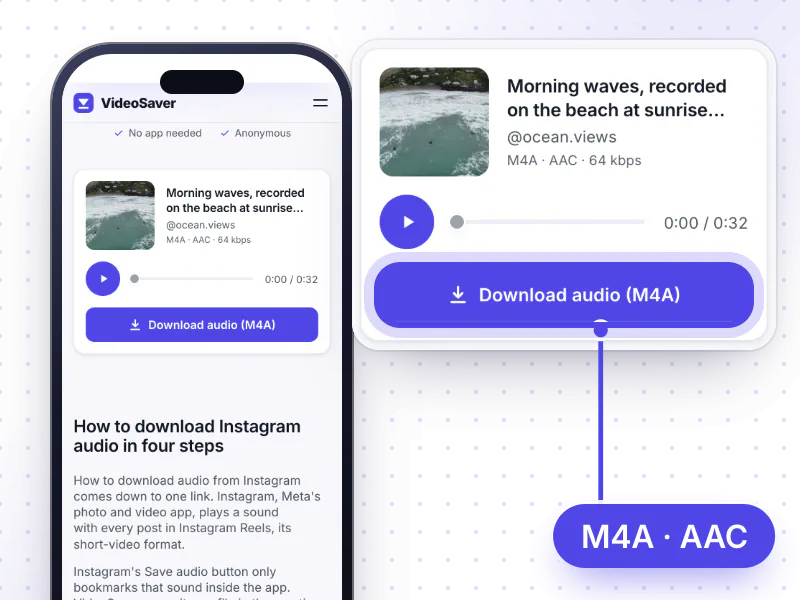
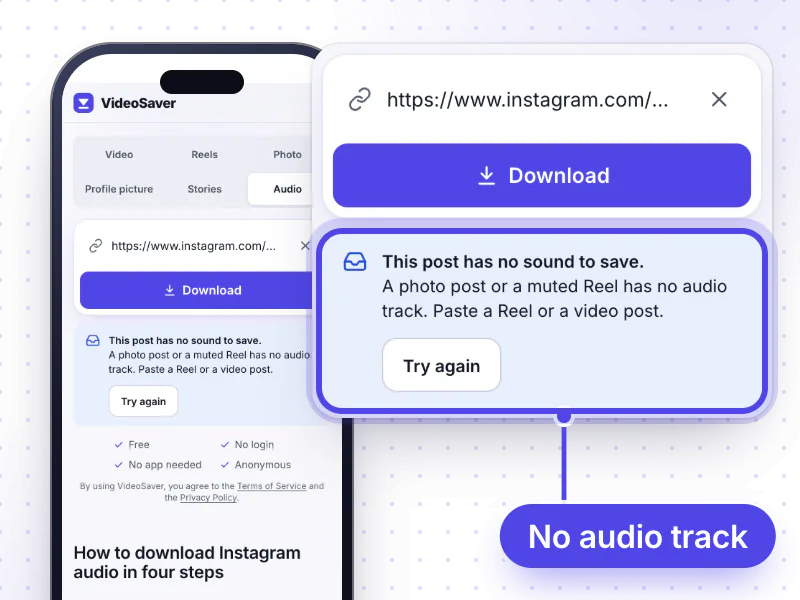
If you only need the music, the VideoSaver Instagram audio downloader saves the track of a public Reel or video post as an M4A file with AAC audio, the codec Instagram uses for the sound in its videos. The guide to saving audio from Instagram explains when an in-app save is enough and when a real file is the better choice.
| Symptom | Likely cause | Fix |
|---|---|---|
| Every Reel and Story is silent | Sound toggled off in the player, Silent mode or low media volume | Tap the video, press a volume button, turn Silent mode off, raise media volume |
| Sound plays only in earbuds or not at all | Paired Bluetooth device takes the audio | Turn Bluetooth off and test the speaker |
| Everything is silent after a phone update | Outdated app or a stuck audio session | Restart the phone, update Instagram, clear the cache on Android |
| One Reel from another account is silent | Track muted, unavailable in your region or blocked | Nothing on your side, ask the author or find the song |
| Your own post lost its music | Licensing changed or no library access | Replace the track once with one you may use |
| The Reel plays in the app, the saved file is silent | The in-app download dropped the licensed track | Save the Reel from a link or keep the track as M4A |
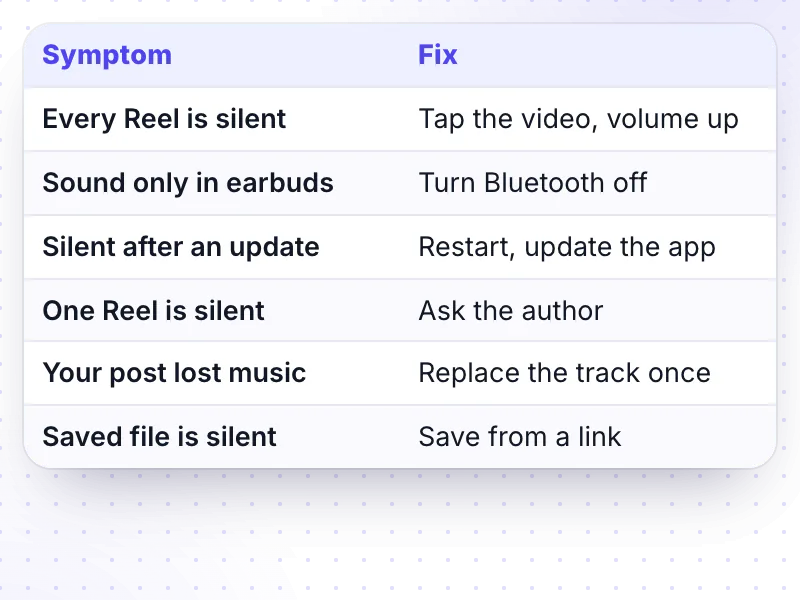
A saved Reel or M4A file is for your own listening, offline viewing or reference. A song belongs to its rights holders, so reposting a saved track in your own content needs their permission or a track from a licensed library.
Frequently asked questions
Short answers to the questions readers ask most about this topic.
Why is there no sound on Instagram Reels?
Instagram Reels play silent for two reasons. If every Reel is quiet, the cause sits on your phone: the sound control in the player, Silent mode, media volume or a paired Bluetooth device. If only one Reel is quiet, Instagram muted or blocked its track, and only the author or the rights holder can change that.
Why does my Instagram Story have no sound?
A silent Story follows the same split as Reels. Test another Story and a Reel first. If they are silent too, check the sound control, Silent mode, media volume and Bluetooth. If only that Story is silent, the music in it may be unavailable in your country or region, or its rights holder blocked it.
Why is my downloaded Instagram Reel silent?
The built-in Instagram download keeps music only when the Reel uses original audio. Reels with licensed background music lose that track in the downloaded copy, according to the announcement reported by Engadget. Meta also confirmed an iPhone bug in which audio went missing in some downloads. A link-based download or an M4A of the sound avoids the first cause.
What does Audio unavailable mean on Instagram?
This label means Instagram muted the track on your own post. The usual causes are no access to Instagram's music library, changed licensing agreements or a rights holder's block. The post stays visible without sound. You can tap the label, then Replace audio, and pick a new track one time per post.
Can I get the sound back on a muted Reel?
The sound of a muted Reel does not come back through any app or downloader, because Instagram itself serves the Reel without that track. The author of the Reel can replace the muted audio one time with a track from the library. A viewer can only ask the author or find the song by name.
Sources
Facts about Instagram features in this article come from these pages.
- Instagram Help Center: How do I turn sound on or off when watching videos? help.instagram.com
- Instagram Help Center: Problems with audio on Instagram help.instagram.com
- Instagram Help Center: Replace muted audio on your Instagram post help.instagram.com
- Instagram Help Center: Access to the licensed music library on Instagram help.instagram.com
- Meta Music Guidelines facebook.com
- Engadget: Instagram makes public Reels downloadable for everyone engadget.com
- XDA Developers: Instagram Reels exports don't have audio (Meta statement) xda-developers.com
- Apple Support: Silence iPhone support.apple.com
- Android Help: Change volume, sound and vibrate settings support.google.com