Instagram Private Downloader: Can You Download From a Private Account?
An Instagram private downloader cannot open a private account. Instagram shows those posts only to approved followers, so the real choices are a follow request, a message to the author or your own data export.
Short answer
No, an Instagram private downloader cannot download from a private account. Instagram shows the photos, videos and Reels of such an account only to followers the owner approved, and a website that holds just a link or a username gets nothing more than a logged-out visitor would. Below: what those sites do, the scam signs and the legal routes.
A private profile on Instagram has one gate: the follow request. The Instagram Help Center states that only people the owner approves can follow it, and only those approved followers see its photos and videos on the profile or in feed. Search, Explore, hashtag and location pages show those posts to no one.
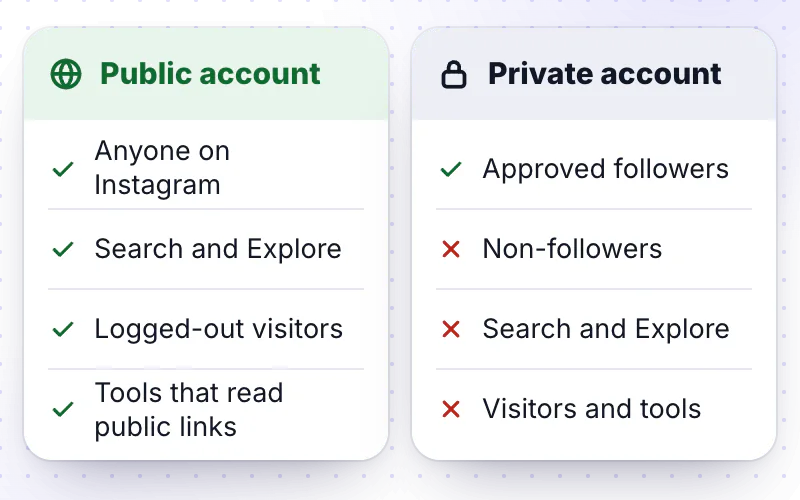
The same Help Center table answers the download question directly. For a public account, anyone on Instagram can download a reel unless the owner turns that off. For a private profile, the answer is "No one". Embedding a private post on another website is blocked too.
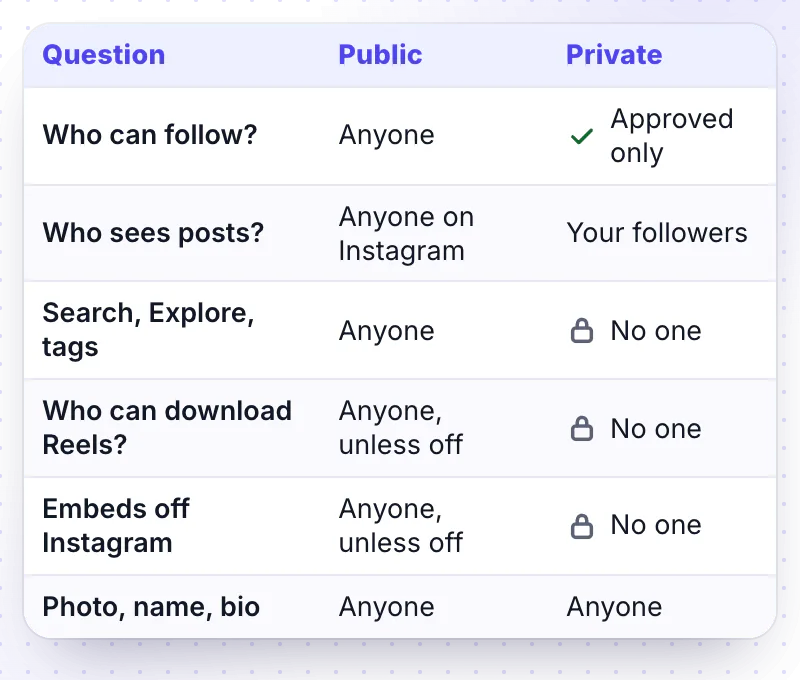
Some details of a closed account do stay public. The profile photo, name, username and bio are visible to anyone on or off Instagram. The posts and their media files sit behind the approval step.
A download tool without a login works like a visitor without an account. It opens what Instagram serves to the open web, and for a locked profile that is the profile card and nothing else. How VideoSaver finds a file follows the same rule. The same logic explains how watching Instagram without an account works and where it stops.
A private Instagram downloader is a parser of data you already have, not a key to someone else's account. That is the conclusion of an independent Hackread review of ten pages that appear in searches for private downloaders.
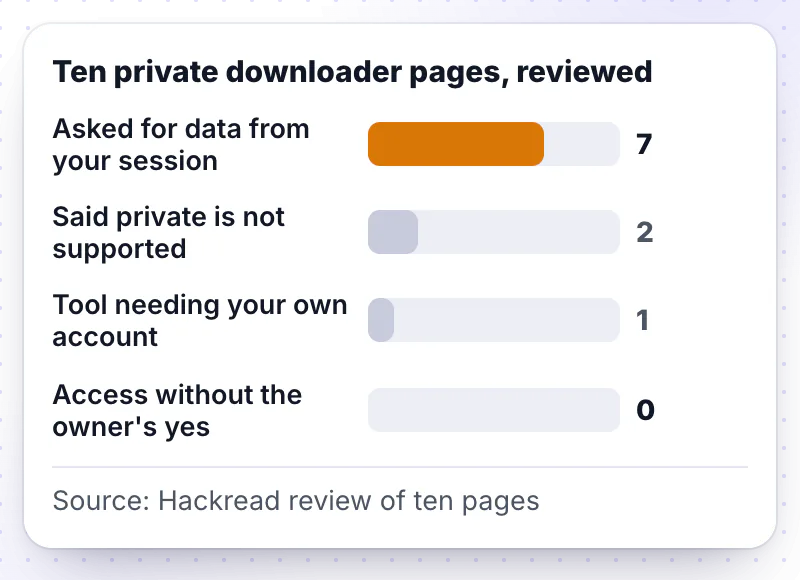
Seven of the ten pages asked the visitor to log in to Instagram, copy what Instagram returned to that logged-in session and paste it into a form, where the site extracts the media links. Two pages said private content was not supported. One was a command-line tool that needed the user's own account. None documented a way to reach private posts without permission from the account owner.
Why a link or a username opens nothing
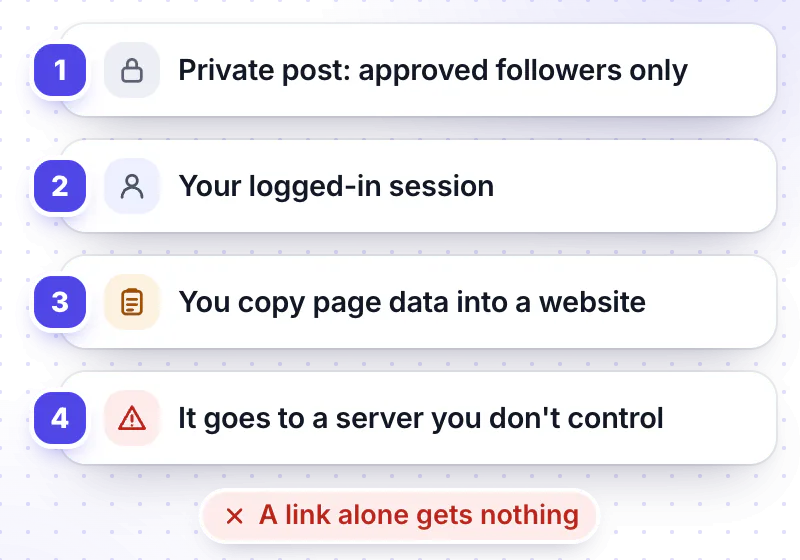
Instagram decides who sees a private post when the request arrives. An approved follower's session gets the post. A request from an unknown website gets the locked profile. A link alone carries no permission, so a site that promises to download private Instagram video from a pasted URL is either describing your own session data or not telling the truth.
Where your pasted data goes
The pasted text is not harmless. Hackread notes that the copied response may contain the private media, related metadata and information generated for your session. On several reviewed pages, the form was set up to send that text to the site's own server, and many of the same pages loaded advertising and analytics scripts from other companies. An instagram private video downloader of this kind turns your trusted session into data on a server you know nothing about.
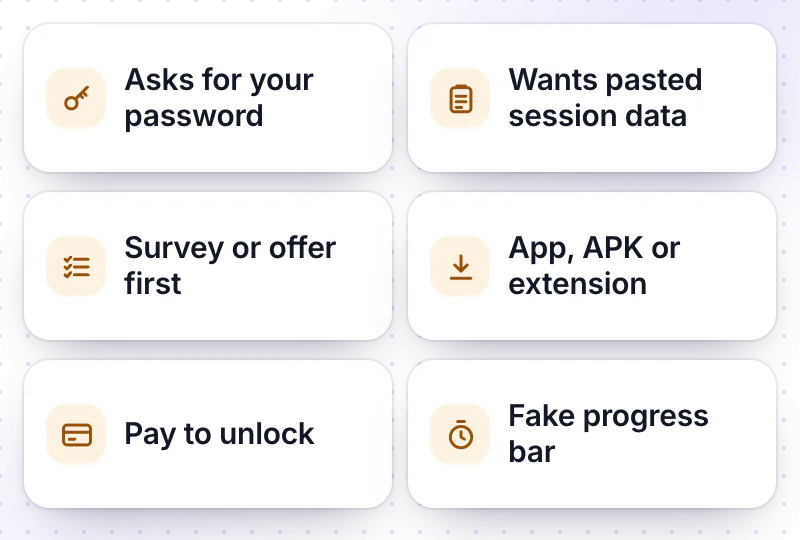
Searches like "instagram downloader private" or "private instagram story downloader" lead to many sites that promise more than a parser. Security researchers at MalwareTips describe the same funnel again and again: a username field, a convincing animation, then a gate that earns the operator money. One of these signs is enough to leave.
- It asks for your Instagram password. The Instagram Help Center warns that an app with your login information, whether a token or your username and password, can get complete access to your account.
- It asks you to paste data from your logged-in session. That data can include private media and session details, and it goes to a server you don't control.
- It wants "human verification" through a survey or an offer. MalwareTips explains that these survey walls pay the operator per completed survey and rarely lead to any result.
- It asks you to install an app, an APK or a browser extension. The FTC advises against downloading free content from unfamiliar websites because criminals use malware to steal usernames and passwords.
- It asks you to pay or start a trial to see the results. Subscription traps turn a free trial into a monthly charge, and the Meta Help Center tells people not to trust messages demanding money or offering gifts.
- It shows a progress bar, a "hack log" or a busy server message. These animations imitate work in progress until the payment or survey step.
Warning
A viewer site that asks for any of the six things above gives you nothing private in return. The only thing it collects is your data, your time or your money.
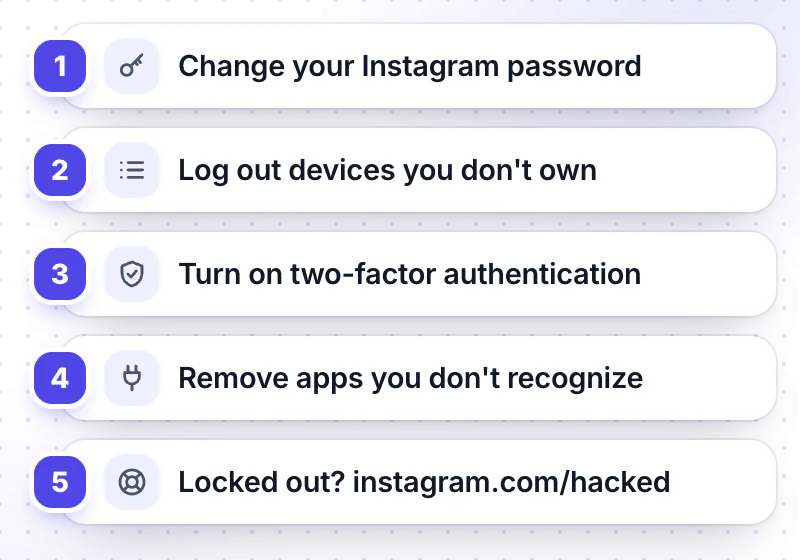
Act right away. A site that collects passwords is phishing, and it may already have tried your login. The Instagram Help Center and the Meta Help Center list these steps for a password that ended up on a strange website.
- Change your Instagram password and use one you don't use anywhere else.
- Open login activity and log out of any device you don't own.
- Turn on two-factor authentication, which asks for a code when a new device tries to log in.
- Remove apps and websites you don't recognize from your connected apps.
- If you can't log in at all, go to instagram.com/hacked in a browser to secure the account.
Also change your email password. The Help Center notes that anyone who can read your email can probably reach your Instagram account too.
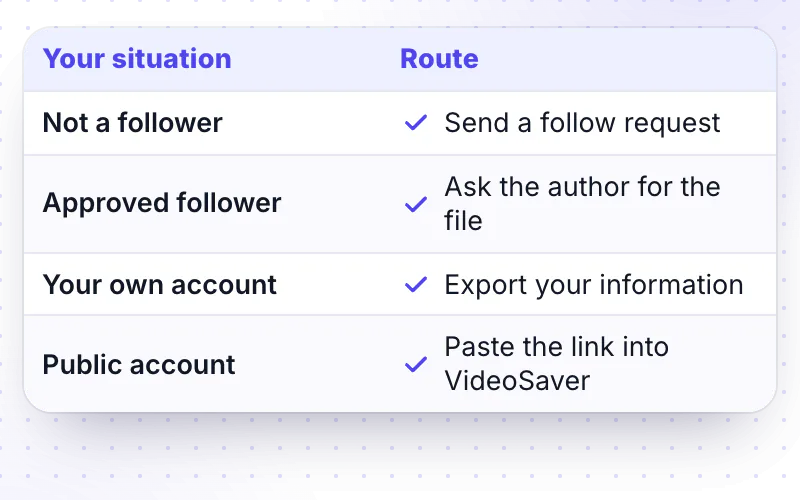
Every legal route runs through the owner of the content. Which one fits depends on who you are in relation to the account.
| Your situation | Route | What you get |
|---|---|---|
| You don't follow the account | Send a follow request | Access to the posts after the owner approves |
| You are an approved follower | Ask the author for the file | The original video from the person who made it |
| It is your own account | Export your information | A copy of your posts and media |
| The account is public | Paste the link into VideoSaver | The file Instagram serves for the post, with no login |
Send a follow request
A follow request is the only way Instagram offers to see a private Instagram account. The owner gets the request and decides. Approval gives you the posts inside the app.
Ask the author for the file
Following a closed account still gives you no Download button for its Reels. The simplest route to a copy is a short, honest message: say which post you mean, why you want it and whether you plan to share it anywhere. A yes from the author gives you the original file instead of a blurry screen recording. The author holds the copyright, so if you want to share the video later, repost it with credit and permission.
Export a copy of your own posts
Your own private Instagram account is a different case. Instagram lets you export your information: open Settings, then Accounts Center (shown as Meta Account on some profiles), then Your information and permissions, then Export your information. You choose the profile, the types of information, the date range, the format and the media quality, and the export goes to your device or to an external service. The guide to downloading your own Instagram Reels covers drafts and single videos as well.
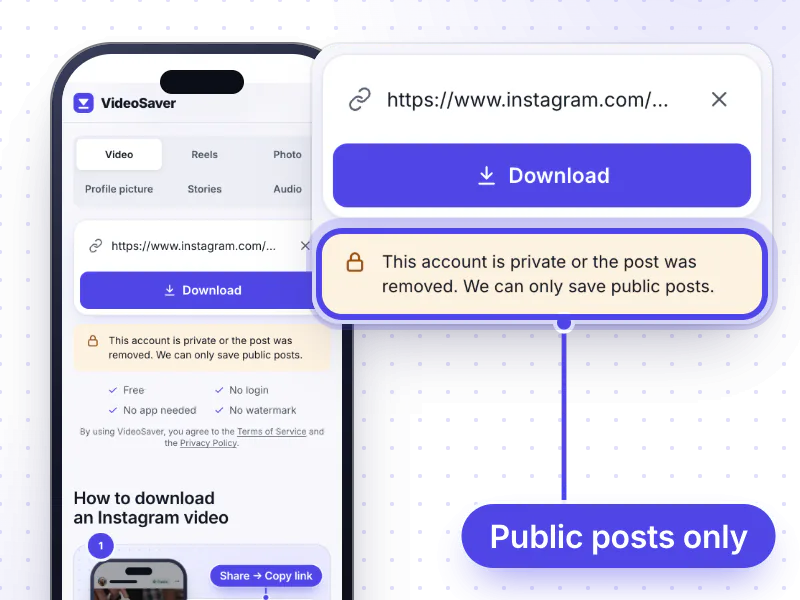
VideoSaver never signs in to Instagram, so it sees exactly what a logged-out visitor sees. Following the account yourself does not change the result, because the tool does not use your account. When you paste a link from a locked profile, the form answers with this message:
"This account is private or the post was removed. We can only save public posts."
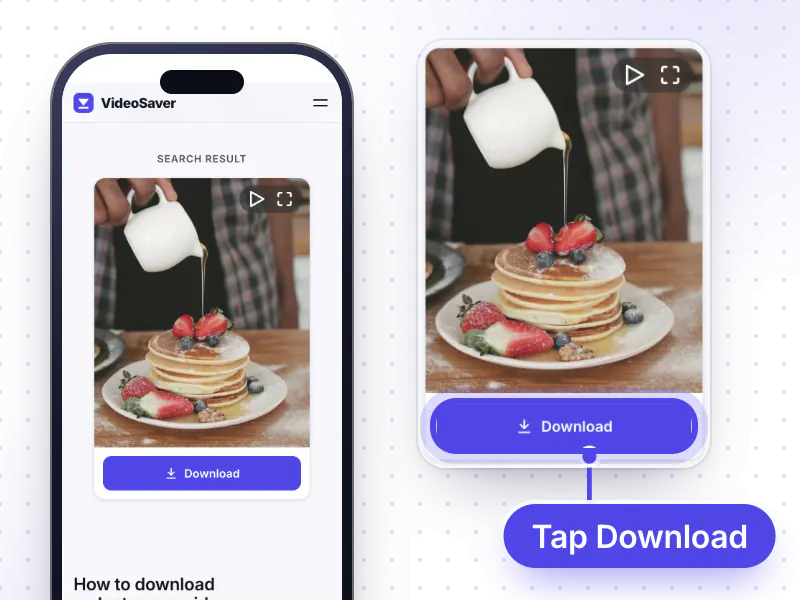
For public content the same form works without an account or an app. It saves videos and Reels from public accounts as MP4, photos, public profile pictures and stories from public accounts, and the author does not get a notification. The article on whether Instagram notifies people when you save or screenshot explains what the app reports and what it doesn't.
A private account is a decision about audience. Some people go private because of a stalker or a job, and some simply want a small circle. A tool that got around that choice would hurt exactly the people the setting protects.
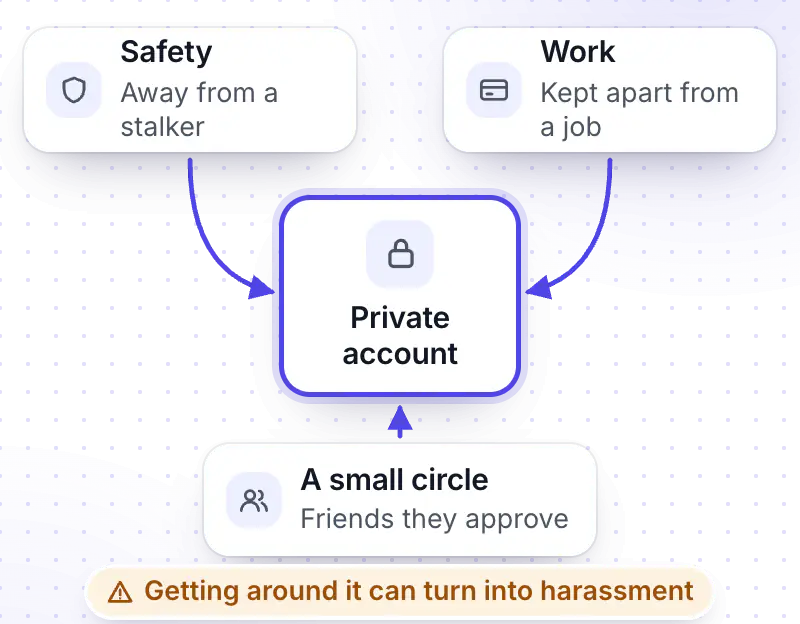
Repeated attempts to see or save someone's private posts against their choice can turn into harassment. Cyberstalking is the use of the internet to follow or harass a person, and getting around a privacy setting is part of that pattern. If you need something from a private Instagram profile, ask the person. A no is the final answer.
Frequently asked questions
Short answers to the questions readers ask most about this topic.
Can a private downloader see posts without following the account?
No. Instagram shows the photos and videos of a locked profile only to followers the owner approved. A website that knows just the link or the username sees what a logged-out visitor sees, which is the profile photo, name and bio. No tool documented a way past that without the owner's permission.
Can I download Reels from a private account I follow?
Not with Instagram's own controls. The Instagram Help Center says no one can download the reels of a private Instagram account. As an approved follower you can watch them in the app. For a copy, ask the author to send you the file. They own it and can share the original.
Are private Instagram viewer sites safe?
No. Sites that promise to open private accounts ask for your password, push surveys or app installs, or ask you to pay to see results. A third-party app with your login can get complete access to your account, and nothing private is unlocked in return.
Can I see the profile picture of a private account?
Instagram shows the profile photo, name, username and bio of any account to anyone, private or public. That is the small circle on the profile. VideoSaver works with public accounts only, so for a locked profile the form shows a message in place of the picture.
How do I get my own private videos back?
Export a copy of your information. In Instagram settings, open Accounts Center or Meta Account, then Your information and permissions, then Export your information. Choose the profile, the types of information and the media quality, and start the export. Higher media quality makes the files larger, so check your free storage first.
Does the owner see that I asked to follow?
Yes. A follow request goes to the owner of the account, and only an approved request gives you access to the posts. The owner decides. If the request stays pending, the posts stay hidden, and sending repeated requests or messages is not a way to change that.
Sources
Facts about Instagram features in this article come from these pages.
- Differences between public and private accounts on Instagram (Instagram Help Center) help.instagram.com
- Review and export a copy of your Instagram information (Instagram Help Center) help.instagram.com
- Secure your Instagram account (Instagram Help Center) help.instagram.com
- Avoid scams and phishing attempts (Meta Help Center) meta.com
- Private Instagram Downloaders Are Parsers, Not Privacy Bypass Tools (Hackread) hackread.com
- How To Recognize, Remove, and Avoid Malware (FTC Consumer Advice) consumer.ftc.gov
- Instagram Hacking Panel Scam Exposed (MalwareTips) malwaretips.com